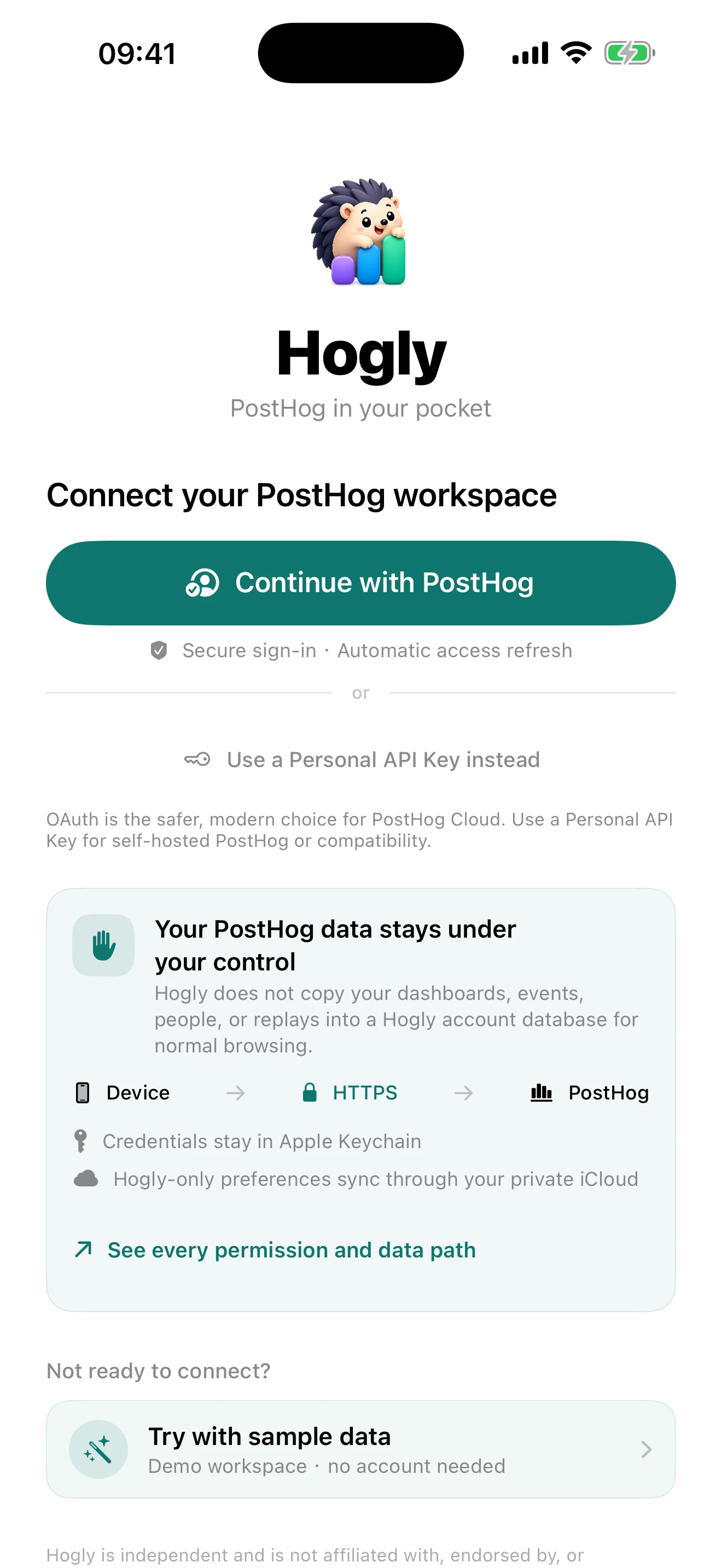
Connecting an analytics workspace to an independent client is a real trust decision. This is the technical answer to what Hogly can access, where each kind of data travels, what is stored, and which optional features introduce a Hogly-operated service.
The short version
- Normal PostHog browsing and explicit actions travel directly between your device and the PostHog host you connected; Hogly does not maintain a second database of your workspace content.
- OAuth tokens and Personal API Keys live in Apple Keychain, while the small set of Hogly-only cross-device preferences lives in your private iCloud database.
- Hogly publishes its current OAuth scope manifest, explains every permission below, and calls out product telemetry and optional remote services instead of hiding them behind an absolute claim.
1. The normal data path is device to PostHog
Hogly's product screens build requests on your device and send them over HTTPS to the host attached to the selected project: PostHog US Cloud, PostHog EU Cloud, or the self-hosted URL you entered. Dashboard, Insight, Event, Person, Replay, Survey, Error Tracking, Experiment, Feature Flag, and Support responses are decoded in the app. They are not routed through hogly.app for normal browsing.
Hogly keeps transient API responses in memory for a responsive interface. It does not copy your dashboards, insights, events, Person profiles, Replay contents, Support messages, or issue details into a parallel Hogly analytics database.
2. Hogly never receives your PostHog password
For PostHog Cloud, Hogly opens Apple's system authentication session. PostHog handles the sign-in page and its cookies; Hogly receives only the authorization result. The authorization-code flow uses PKCE, which binds the result to the app instance without shipping a reusable client secret inside the app.
The app exchanges and refreshes the grant directly with PostHog's OAuth token endpoint. Access tokens, refresh tokens, and Personal API Keys are stored as generic-password items in the app's shared Apple Keychain access group. They are not written to UserDefaults, SwiftData, a plain-text file, CloudKit records, or the Hogly website.
Hogly enables iCloud Keychain synchronization so a connection can follow the user to their other Apple devices. Apple performs that credential synchronization; Hogly does not receive a copy. An OAuth grant can be revoked from PostHog, and a Personal API Key can be deleted from PostHog at any time.
You can inspect Hogly's live, machine-readable OAuth Client ID Metadata Document. It identifies the public client, callback, PKCE-compatible grant type, and exact requested scope names.
3. iCloud sync is for Hogly-owned preferences
PostHog remains the source of truth for PostHog concepts. When PostHog already stores a dashboard pin, Insight favorite, tag, ticket, flag, survey, annotation, or Replay playlist membership, Hogly reads or updates that object in PostHog instead of recreating it in iCloud.
Hogly uses the user's private CloudKit database only for settings that PostHog does not model and that are useful on another Apple device:
- the chosen Overview cards and their order;
- the selected project references, cached permission list, project color/icon, and user-entered external project binding such as a RevenueCat Project ID;
- Hogly's Project Detail section order and visibility;
- Person favorites as project-scoped
distinct_idreferences, plus pinned property keys and display aliases.
Those Person preference records do not contain names, email addresses, property values, or activity history. Those details are requested from PostHog when needed. Some per-device features, such as a Local Quick Funnel, intentionally stay only on that device.
4. Why Hogly requests these PostHog permissions
Hogly needs a small read-only permission floor to establish the workspace and load its primary dashboards and insights. The remaining permissions are optional. New connections default to Full access, and you can customize access by product area before connecting. Existing connections can keep their current grant; a feature that needs missing access offers an explicit permission update. Expanding the optional metadata alone does not add scopes to older apps' authorization requests. PostHog treats a resource's :write permission as satisfying its matching :read permission. The public metadata document above is the current machine-readable source; this ledger explains the human purpose of every available scope.
Read access
Write access, used only by matching product actions
OAuth starts with the required floor plus the access level you select. The Personal API Key path remains available for self-hosted PostHog and compatibility; features whose scopes are missing stay unavailable and can request an explicit access update instead of silently bypassing PostHog's permission model.
5. The optional services are narrow—and disclosed
A truthful architecture description needs to name the cases that are not simply device-to-your-PostHog-host.
Remote Support and Error notifications
Remote alerts are off until you enable them for a project. The app then configures a narrowly scoped PostHog Workflow or destination that calls push.hogly.app. The service stores an opaque installation identity, an encrypted APNs token, the RevenueCat app-user ID needed to verify Pro eligibility, the project host and numeric ID, the selected notification topic, opaque source hashes, and temporary event or ticket identifiers.
The source contract rejects and discards customer names, Support message bodies, and stack traces. APNs receives a generic localized alert plus the minimum project/ticket/issue route needed to open the right screen. Delivery records expire after 30 days, closed aggregation windows after 7 days, and disabled installations after 90 days.
Hogly's own support image messages
If you explicitly send the Hogly creator-support conversation an image, a bounded push.hogly.app request uploads it to Hogly's own PostHog project and forwards the message. The proxy returns Cache-Control: no-store and does not use a connected customer's PostHog credential.
Product analytics, purchases, and diagnostics
Release builds use Hogly's own PostHog project for anonymous app lifecycle, a bounded set of onboarding/product/monetization outcomes, and crash diagnostics. Connection events include fields such as OAuth versus API Key, duration, broad failure category, and imported project count—not credentials, host URLs, organization names, project names, or raw server error text. RevenueCat separately processes purchase and entitlement data. None of this telemetry is written into the PostHog workspace you connected.
6. Controls you can use before and after connecting
- Explore first. Sample Data lets you inspect Hogly without a PostHog account or credential.
- Review consent. PostHog shows the OAuth grant before approval, and the public metadata document can be checked independently.
- Revoke access. Revoke Hogly's OAuth grant or delete a Personal API Key in PostHog whenever you choose.
- Disconnect locally. Removing a connection deletes its credential from Hogly's Keychain storage and removes the local project entry.
- Keep remote alerts off. Local browsing, widgets, and manually opened views do not require Hogly's remote notification service.
This technical explainer complements the Hogly Privacy Policy. If the implementation changes, we will update the public permission manifest, the in-app disclosure, and this article together.
Quick answers
Frequently asked.
Can Hogly see my PostHog password?
No. PostHog sign-in happens in Apple's system authentication session. Hogly receives an OAuth result, not your password or PostHog web cookies.
Does Hogly store a copy of my PostHog analytics?
Normal workspace content is requested directly from PostHog and is not copied into a parallel Hogly analytics database. Private iCloud stores only Hogly-owned configuration and references, while optional remote services are described explicitly in this article.
Why are so many requested permissions write permissions?
Hogly includes explicit management actions as well as read views, and PostHog write scopes also satisfy matching read access. Connecting is read-first; a mutation runs only after the matching user action or an explicitly enabled remote-alert setup.
Where can I verify Hogly's current OAuth scopes?
Open https://hogly.app/oauth/hogly-client.json. It is the live Client ID Metadata Document PostHog reads and contains the exact current scope names.