Treat your masking configuration as a testable hypothesis. Build a screen with unmistakable fake values, record every UI state your app renders, and watch the uploaded replay before shipping. The pass condition is simple: a value you classified as sensitive must never be readable in the replay.
The short version
- Record the resolved native SDK, wrapper, framework, Xcode, OS, device, and replay mode before interpreting a result.
- Test ordinary text, inputs, images, custom views, animation, scrolling, and presentation transitions with synthetic markers.
- Re-run the replay test after SDK, React Native, Xcode, or UI architecture changes; a green configuration review does not prove the pixels were redacted.
A setting is an intention; the replay is the evidence
Official documentation and release records checked September 20, 2026. This guide provides a verification protocol. We did not submit recordings from every SwiftUI, UIKit, and React Native combination, and we do not claim that one result applies to all versions. Use fake values in a test project and review your own replay.
PostHog says its mobile privacy controls run in the app so masked data is not sent to PostHog. That is the desired contract. Your release decision still depends on whether the UI hierarchy, SDK version, wrapper, and capture mode in your build produce that outcome. A dashboard toggle cannot inspect a custom component, a wrapper's resolved native dependency, or a view during an animation.
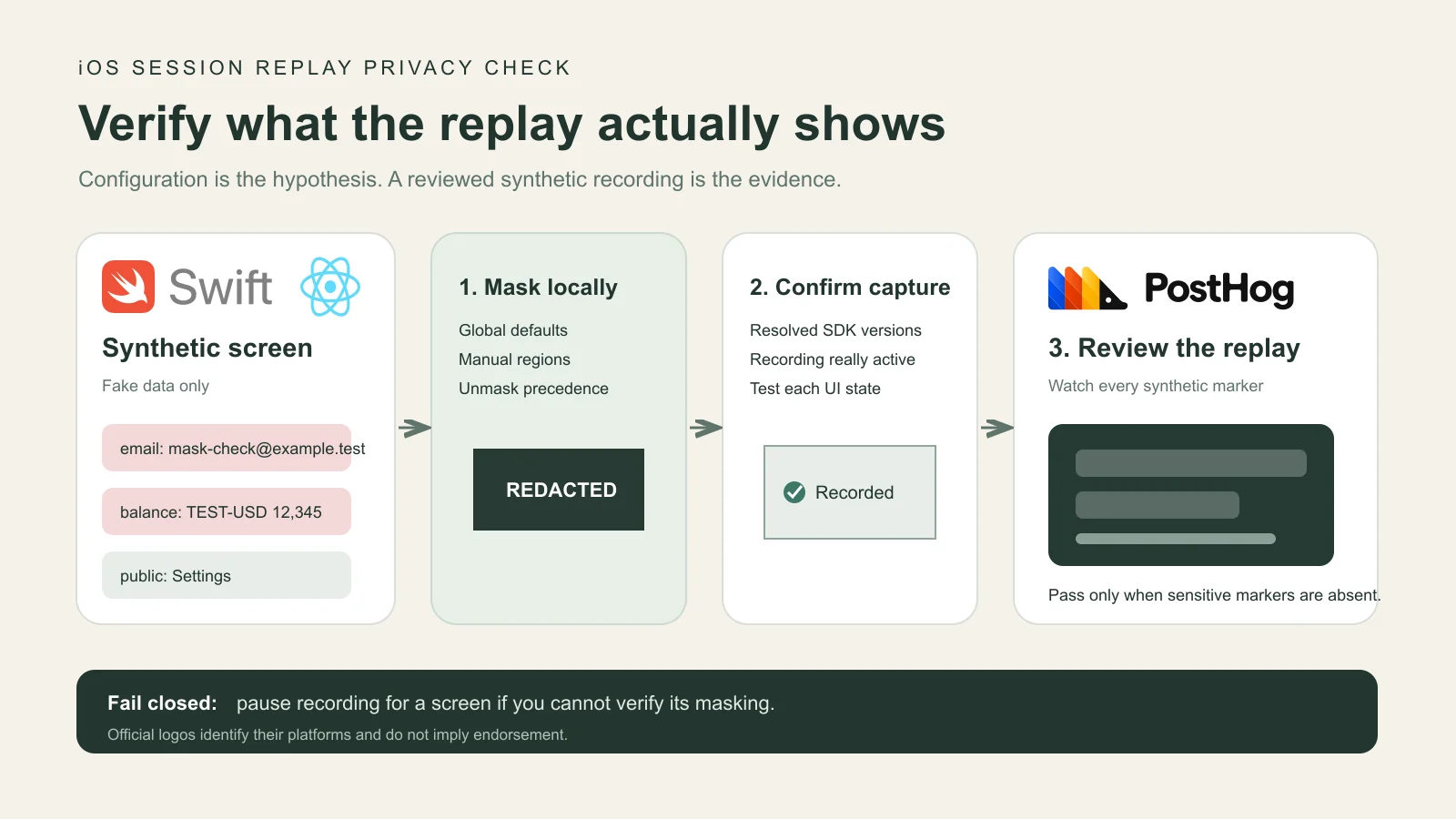
Start from a strict rule: if a screen can show credentials, financial details, health information, private messages, or another value your team classifies as sensitive, do not enable recording for that screen until a synthetic replay proves the content is covered. This is an engineering acceptance test, not legal advice or a substitute for your privacy review.
Freeze the complete stack before you test
Write the version manifest before opening the app. For native iOS, include the resolved posthog-ios version, Xcode build version, iOS version, device model, SwiftUI or UIKit path, and whether screenshot mode or another replay mode is active. For React Native, also record the JavaScript package versions, the native replay plugin, React Native version, old or New Architecture, dependency manager, and the resolved posthog-ios version.
| Layer | Record | Why it matters |
|---|---|---|
| App | Commit, build, environment, project | Connects a replay to the exact UI and settings under test. |
| Native | posthog-ios, Xcode, iOS, device | Masking and rendering fixes ship in specific native SDK versions. |
| UI | SwiftUI, UIKit, React Native; architecture | The renderer determines which native view classes and regions exist. |
| Replay | Mask flags, manual regions, mode, project rules | Proves the intended policy and whether recording was eligible. |
| Evidence | Replay URL, run time, test marker list | Lets a reviewer inspect the actual output instead of trusting a screenshot of settings. |
For React Native, inspect the lockfile and native resolution rather than reporting only the JavaScript wrapper version. PostHog's current React Native installation guide describes how CocoaPods, a hybrid Swift Package Manager path, and full Swift Package Manager resolution can pull the native iOS SDK. The version that reaches the binary is the one that matters.
Build a synthetic screen that fails visibly
Create a test-only screen that never uses customer data. Give each field a unique marker that could not be mistaken for normal UI: MASK_EMAIL_7@example.test, TEST_BALANCE_12345, and an image containing MASK_IMAGE_9. Include a public control label such as Settings so you can detect a replay that is entirely blank as well as one that exposes sensitive content.
The screen should exercise the shapes your product actually renders: a secure input, a regular input, ordinary Text or UILabel, an image, a manually masked composite view, a custom component, a scroll container, a sheet or full-screen cover, and a view that fades or moves. For React Native, include Text, TextInput, an image, SVG content if used, and a PostHogMaskView around a nested subtree.
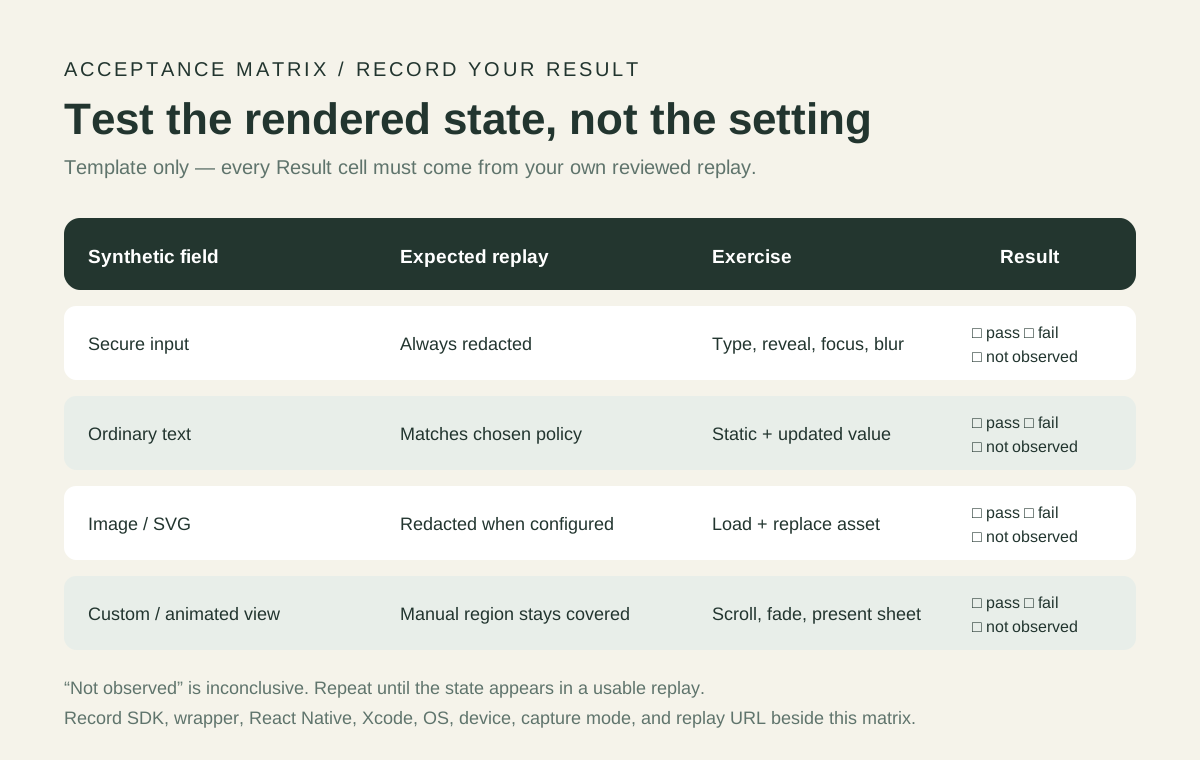
Keep the marker list beside the replay. A reviewer should search the full recording, including typing, focus changes, scrolling, a state update, background/foreground, and presentation transitions. Test both a Simulator and the physical-device class you support when rendering differs; label each result separately.
Apply controls for the framework you actually ship
For UIKit, PostHog's current privacy guide documents ph-no-capture on a view's accessibilityIdentifier to redact the view. For SwiftUI, it documents postHogMask() for a view and its children. It also says SecureField is automatically masked, while text-field traits such as an email keyboard type trigger masking. Test those paths rather than assuming a custom control inherits the semantics of a standard field.
For React Native, the guide says text, inputs, and images are masked by default. It recommends PostHogMaskView for explicit manual masking, with accessibilityLabel="ph-no-capture" as an alternative. Custom inputs that do not use standard platform fields may not be detected automatically, so include them explicitly in your acceptance screen.
Unmasking is the dangerous direction. Current iOS docs say postHogNoMask() and ph-no-mask apply to a subtree and take precedence over default masking and a nested mask. Support for the ph-no-mask identifier begins in iOS SDK 3.71.0. Review every unmask token as a privacy-sensitive code change, keep it on the smallest known-safe subtree, and add a regression marker beneath it.
For payment, authentication, contact-picker, or another third-party surface you cannot verify, use PostHog's documented programmatic stop/start controls around the screen. An allowlist of recordable screens is easier to review than a growing denylist when most of the app is sensitive.
Prove that recording happened, then inspect every marker
A blank replay does not prove successful masking. First confirm the test session was eligible under project settings, that recording started, and that the session was sampled. Then verify a public control element and the expected interaction sequence appear. Only after that should you judge whether the sensitive markers were redacted.
- Start with a new test session and record its start time and distinct test identity.
- Visit the synthetic screen and perform the scripted sequence once.
- Wait for ingestion, open the exact replay, and confirm the control label and actions are present.
- Inspect every frame where a sensitive marker is created, changed, scrolled, animated, or covered.
- Record pass, fail, or not observed for each matrix row. “Not observed” is not a pass.
Do not paste the raw sensitive marker into production analytics. Keep this workflow in an isolated project or an internal test build. Preserve enough evidence for another engineer to repeat the result without storing real personal data.
Use release history to choose regressions, not to skip testing
A recent React Native example shows why the native version belongs in the manifest. posthog-ios PR #777 added recognition for React Native New Architecture text, image, and react-native-svg view classes. It merged August 24, 2026, and the same change appears in the official 3.69.9 release. Treat that historical path as fixed in 3.69.9 and later, while still verifying your resolved dependency and rendered result.
Issue #821 remains open as of this check and describes three source-review concerns: a failed mask render, a visible child beneath a zero-size parent, and a fading view. Its author explicitly says the cases came from code reading and were not reproduced on a device. The official 3.73.2 release says the SDK now drops a screenshot when a masked image cannot render and collects masks under non-clipping zero-size parents and during fades. 3.73.3 adds related inheritance and animation fixes. The defensible statement is that release notes address the reported paths; the still-open issue and lack of our own device reproduction prevent a broader guarantee.
SwiftUI rendering has its own version boundary. The current privacy guide says apps built with Xcode 26 should use posthog-ios 3.36.2 or later for postHogMask() and postHogNoMask() behavior. Keep transition, lazy-container, and primitive-view cases in the matrix whenever Xcode changes.
Make replay privacy a release gate
Run the focused matrix when the replay SDK, a wrapper, React Native architecture, Xcode, OS deployment target, or a sensitive screen changes. Store the manifest and result with your release evidence. Do not copy a result forward when the rendering stack changed.
- Pass: recording is confirmed, public controls render, and every sensitive marker is unreadable through every exercised state.
- Fail: any sensitive marker is readable, even for one transition frame. Stop recording on that surface or disable replay while you investigate.
- Inconclusive: no usable replay arrived, a UI state was absent, or the resolved version is unknown. Fix the test and repeat.
Once the recording is safe and useful, you can inspect it on PostHog web or follow Hogly's mobile error-to-replay workflow. Hogly reads existing PostHog recordings; it does not change what the capture SDK masks or sends.
Official references and public issue context
- PostHog Session Replay privacy controls — current platform controls, masking defaults, subtree precedence, and sensitive third-party screen guidance.
- PostHog recording rules and programmatic controls — start/stop behavior and versioned rule support.
- posthog-ios releases — verify the notes for the exact version resolved by your build.
- React Native Fabric masking PR #777 and source-review issue #821 — historical context with different evidence strength.
The official docs are the configuration reference. A release note documents a code change. An issue reports a concern. Your reviewed synthetic replay establishes what your app build produced.
Quick answers
Frequently asked.
Does enabling maskAllTextInputs prove all iOS text is hidden?
No. It describes an intended masking policy. Custom components, framework rendering, wrapper/native version resolution, unmask precedence, and transitions still need an end-to-end synthetic replay test.
Was the React Native Fabric masking issue fixed?
PostHog merged PR #777 and released its Fabric text, image, and SVG class handling in posthog-ios 3.69.9 on August 24, 2026. Verify that your app actually resolves 3.69.9 or later and repeat the replay test.
Should I use ph-no-capture or PostHogMaskView in React Native?
PostHog currently recommends PostHogMaskView because it is explicit and does not repurpose accessibility metadata. The documented ph-no-capture accessibility label remains an alternative.
What should I do when a third-party iOS screen cannot be verified?
Pause session recording around the screen or record only an allowlist of known-safe screens, then confirm the resulting replay.
Is this test a compliance certification?
No. It is an engineering acceptance test for a specific app build and replay configuration. Your legal, privacy, consent, retention, and access-control obligations require separate review.