A conversion number is useful; the path into it is more useful. Hogly 1.1.1 brings acquisition evidence into the mobile investigation flow so you can move from source to Person to product and payment activity without pretending every product has the same analytics setup. The release is currently in Apple review.
The short version
- For apps, RevenueCat can send subscription events and Apple Ads attribution into PostHog; Hogly keeps that evidence together on the matching Person.
- For websites, start with a source-aware Session Replay or Explore → Support, then connect the commercial events that matter with a PostHog Funnel.
- RevenueCat's PostHog integration and Hogly's RevenueCat Project ID are two separate settings with different jobs.
One business question, two practical flows
The founder-level question is simple: where did this customer come from, what did they do, and did they pay? The reliable answer depends on whether the product is an app or a website.
For an app that already uses RevenueCat, the purchase system can supply subscription lifecycle and Apple Ads attribution. PostHog remains the behavioral timeline, and Hogly brings the matching evidence into the Person screen.
For a website, the shortest useful path often begins with Replay. When the signal arrives as customer feedback, Explore → Support offers another entry point with the same source context. Your own pricing, checkout, and payment events then provide the conversion milestones for a Funnel.
Configure RevenueCat to send subscription events to PostHog
RevenueCat maintains an official PostHog integration guide. The important first step is identity: RevenueCat and PostHog must describe the same customer with the same key.
- Align the user identity. Set RevenueCat's reserved
$posthogUserIdcustomer attribute to the PostHog distinct ID. In the RevenueCat iOS SDK,setPostHogUserID(...)provides that bridge. If the attribute is absent, RevenueCat falls back to its own App User ID, often an anonymous$RCAnonymousID:…. - Open RevenueCat Dashboard → your project → Integrations → PostHog.
- Enter the PostHog Project API key. This is the public project key used by the capture API, not a personal API key.
- Select the right PostHog destination. Choose US, EU, or Self-hosted and provide the self-hosted domain when applicable. RevenueCat also supports a separate sandbox project key.
- Choose the event names and revenue reporting basis. Keep the documented defaults or map them to your existing taxonomy, then choose gross revenue or revenue after commission and estimated taxes.
- Test with a new sandbox customer. Complete a sandbox purchase, confirm successful PostHog delivery in RevenueCat Customer History, then verify the Person and event in PostHog.
Default events include rc_initial_purchase_event, rc_trial_started_event, rc_trial_converted_event, and rc_renewal_event. RevenueCat also updates the PostHog Person's rc_subscription_status when it delivers applicable events.
Add Apple Ads attribution through RevenueCat
Subscription events answer what happened commercially. Apple Ads attribution adds which native acquisition evidence led there. RevenueCat documents this separately in its Apple Search Ads setup guide.
- In RevenueCat, open the project and choose Apple AdServices from Integrations.
- Add an Apple Search Ads integration and choose Basic or Advanced to match the Apple Ads product you use. Advanced connects through Sign in with Apple; RevenueCat recommends Read Only permission.
- After configuring the Purchases SDK, enable token collection with
Purchases.shared.attribution.enableAdServicesAttributionTokenCollection().
Standard AdServices attribution does not require App Tracking Transparency consent; Detailed attribution does. RevenueCat requests the attribution data from Apple and can make the resulting campaign, ad group, keyword, claim type, and related attributes available to downstream integrations such as PostHog. Allow time for new attribution and purchase data to arrive.
Bind the RevenueCat Project ID in Hogly
The RevenueCat integration above sends data to PostHog. Hogly's Project ID setting has a different purpose: it tells Hogly which RevenueCat project owns this PostHog project, so a Person with RevenueCat evidence can open the exact customer destination.
- In RevenueCat, choose the project, then open Project Settings → General.
- Copy the RevenueCat Project ID. Current IDs begin with
proj. - In Hogly, open Settings → Advanced → PostHog account → organization → Projects → project.
- Under Integrations → RevenueCat, paste the Project ID and tap Save.
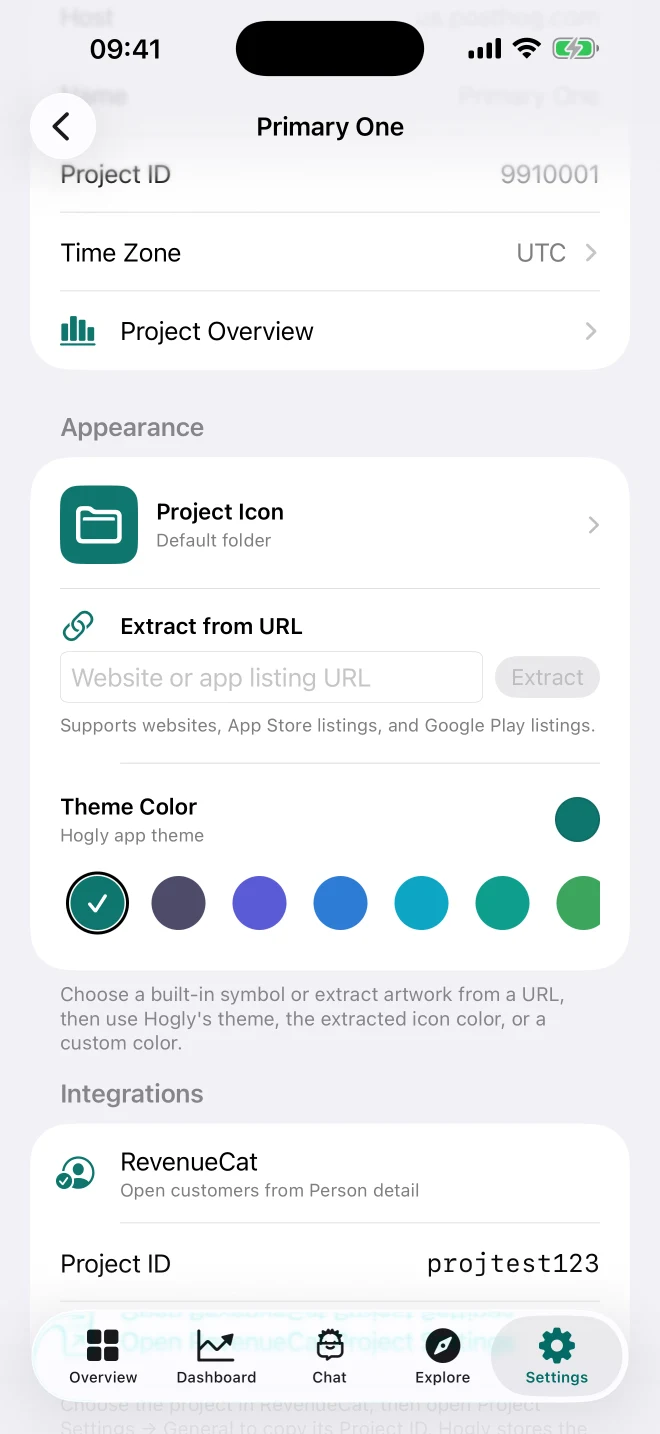
Once saved, the Person page can build a RevenueCat customer link from two explicit pieces of data: the configured RevenueCat Project ID and the app_user_id carried by the matching RevenueCat event. A PostHog distinct ID alone is not enough.
Read the app flow on the PostHog Person
Open a Person in Hogly and read the evidence in layers. Recent activity shows what the customer did. Acquisition keeps web first touch, native install attribution, and RevenueCat linkage separate, so one source does not overwrite another.
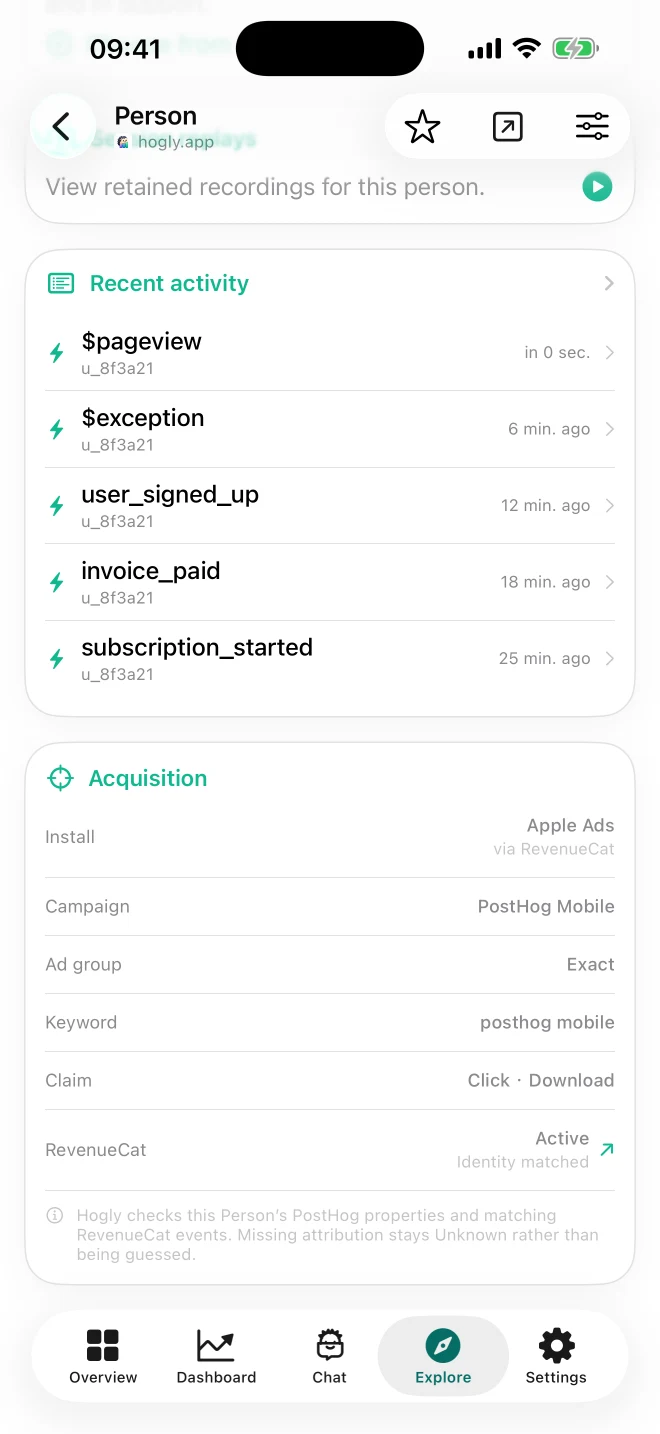
In this example, the native install is attributed to Apple Ads via RevenueCat. Campaign, ad group, keyword, and click/download claim are visible beside the current subscription context. When the Project ID is configured, the RevenueCat row opens that customer directly.
This workflow ships in Hogly 1.1.1, which is currently under Apple review.
For a website, begin with Replay and finish with a Funnel
Web products usually already have the source fields PostHog needs: click IDs, paid UTMs, tagged campaigns, and referring domains. Hogly reads that embedded Person context and displays sources such as Google Ads, Reddit Ads, Meta Ads, or a referring site on Session Replay and Support surfaces.
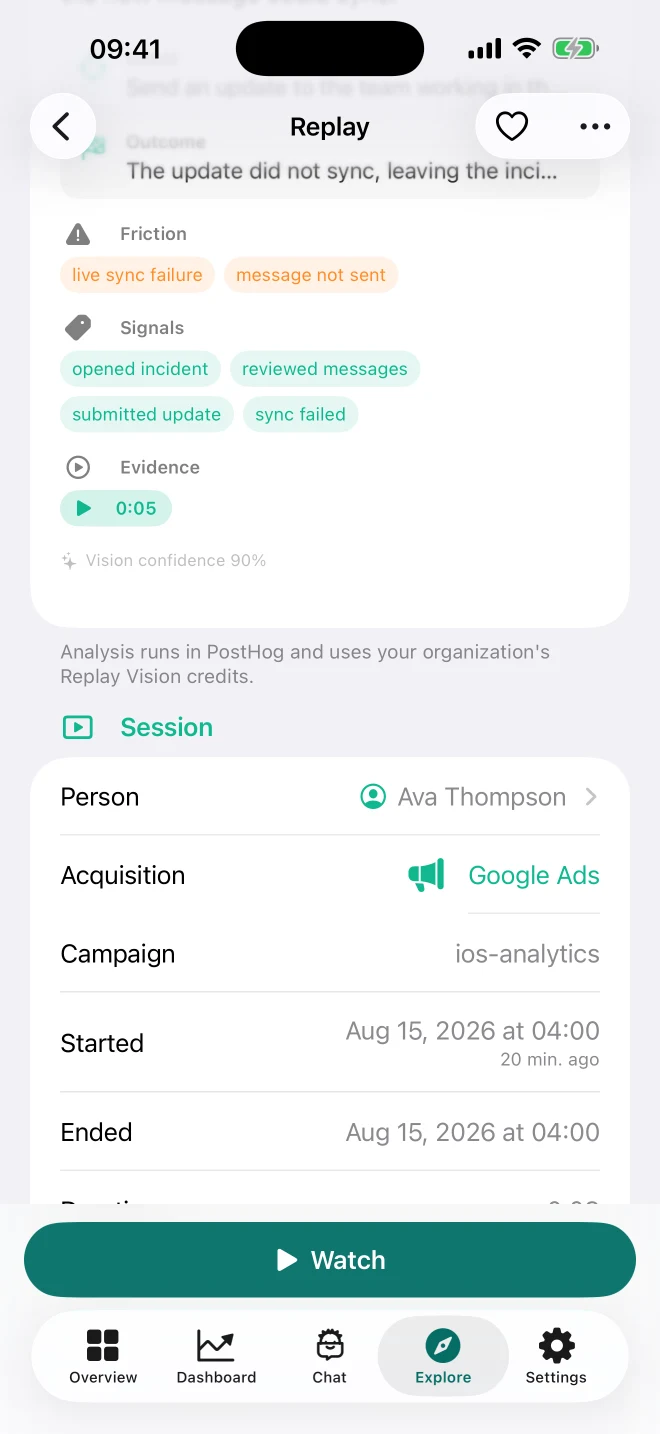
Hogly does not import or manage your Google Ads or Reddit Ads account here. It interprets acquisition properties already present on the PostHog Person or recording.
To connect the commercial path, capture events that match your product instead of forcing a universal vocabulary. A typical sequence is:
pricing_viewedcheckout_startedpayment_completed
Build a PostHog Funnel from those events, choose the conversion window that matches the buying cycle, and break down or filter by the acquisition properties your implementation captures. Replay explains the session; the Funnel measures the path across sessions and users.
Use Explore → Support when the signal is a customer conversation
Not every conversion problem first appears in a dashboard. A buyer may report a failed checkout, a duplicate charge, or confusion about a plan. Open Explore → Support in Hogly to see that feedback beside the acquisition context PostHog already captured.
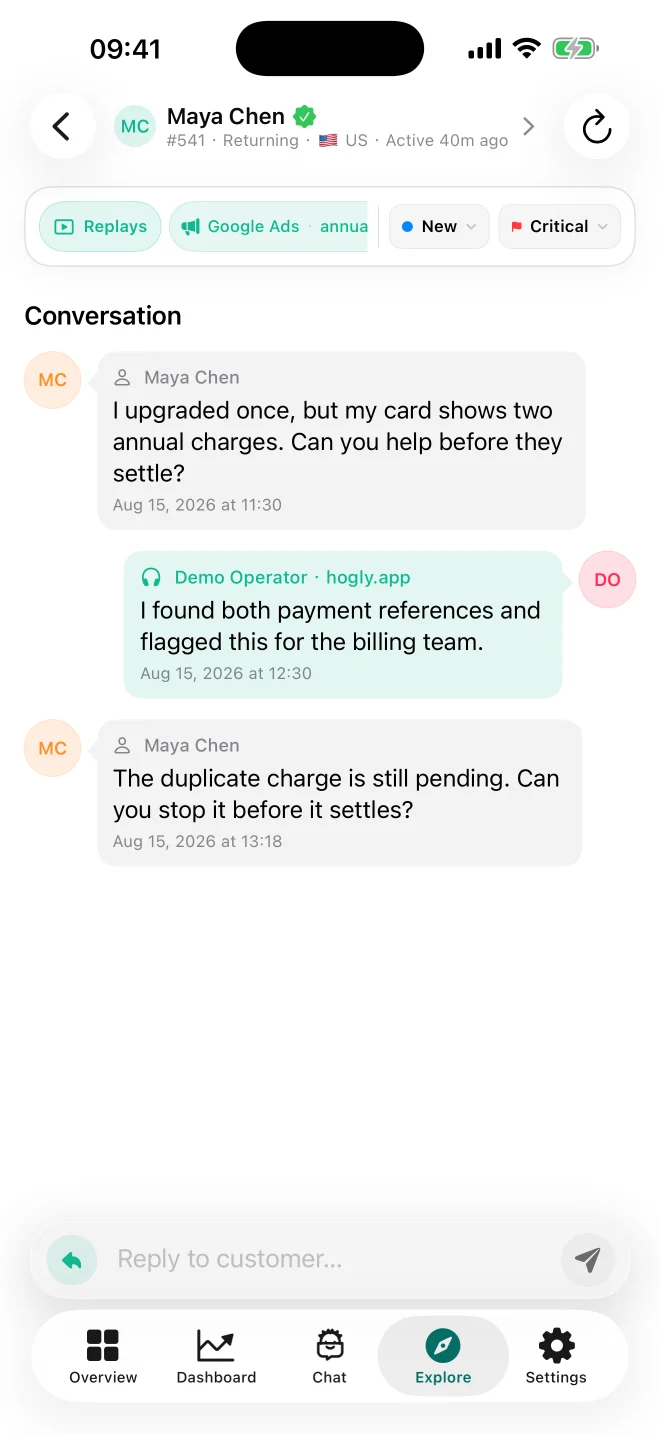
In this example, the conversation is linked to explicit Google Ads evidence and the annual-plan campaign. The Replays action opens the reported recording first, followed by the same Person's recent retained recordings, so you can compare what the customer said with what happened in the product.
The source is context, not a causal claim: it tells you how the customer arrived, not whether the campaign caused the billing problem. The Support case, Replay, and your PostHog Funnel answer different parts of the same founder-level question.
What comes next for web payments
The web flow works today with your own PostHog events and Funnels. The next integration I plan to explore is Stripe, using the RevenueCat connection as the reference: preserve the payment provider's authoritative lifecycle, align identities carefully, and make the useful customer path easier to open from Hogly.
That is exploration, not a shipped Stripe integration or a promise that every checkout will become one automatic Overview. The goal is to learn whether Hogly can offer a more out-of-the-box web revenue workflow without hiding the event definitions and identity decisions that make the analysis trustworthy.
Quick answers
Frequently asked.
Does Hogly 1.1.1 include these acquisition views?
Yes. The Person acquisition and RevenueCat context plus source-aware Replay flow are included in Hogly 1.1.1, which is currently under Apple review.
Does entering a RevenueCat Project ID enable the PostHog integration?
No. Enable event delivery in RevenueCat Dashboard under Integrations → PostHog. The Project ID in Hogly binds a PostHog project to the correct RevenueCat project for customer navigation.
Does Hogly connect directly to Google Ads or Reddit Ads?
No. Hogly interprets source evidence already captured in PostHog, such as click IDs, UTMs, tagged campaigns, and referring domains.
Is Stripe already integrated like RevenueCat?
Not yet. A Stripe integration is an exploration direction; web teams can use their own PostHog payment events and Funnels today.