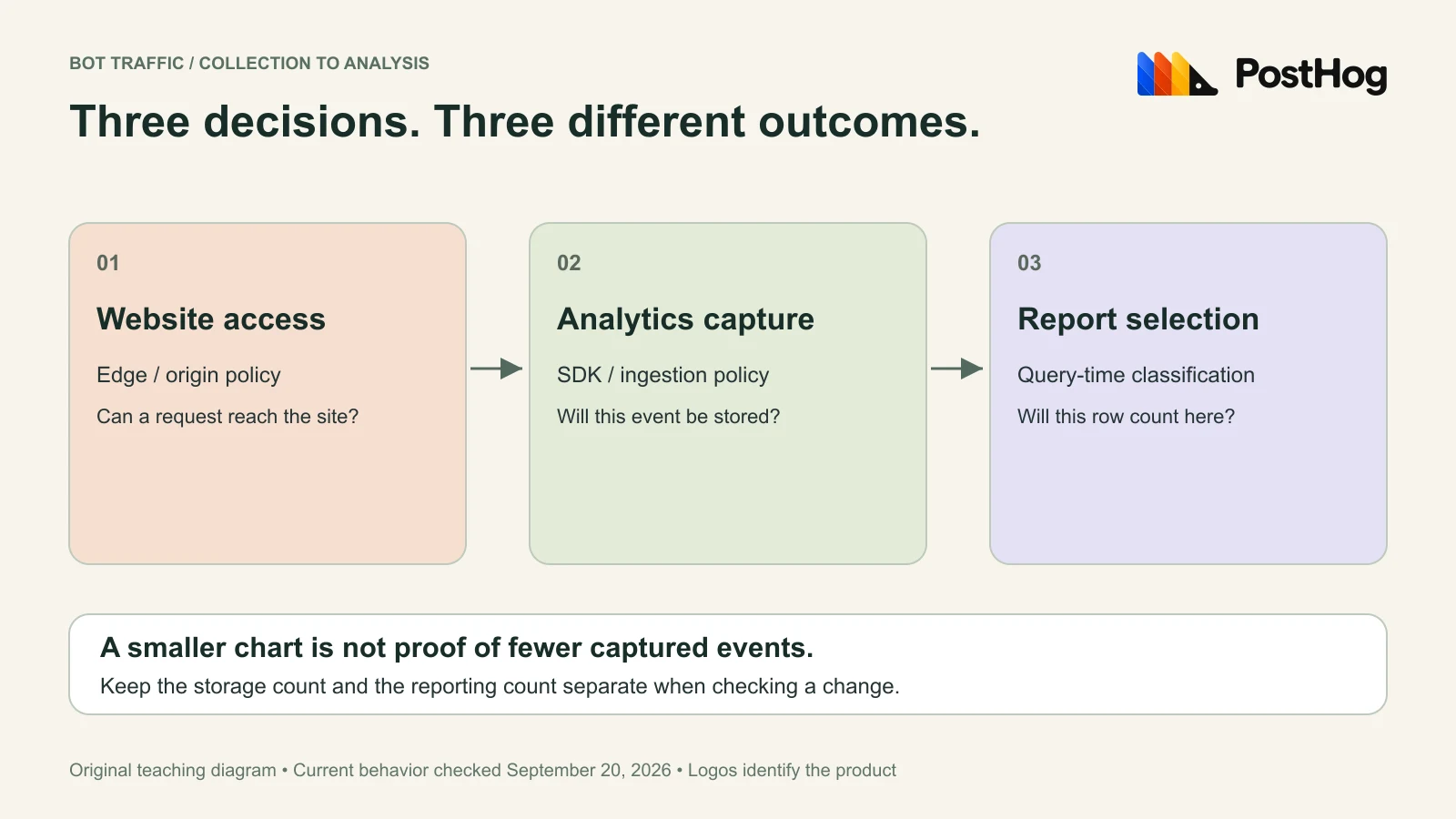
To remove bots from a PostHog chart, filter the report. To prevent future analytics events from being stored, change collection. To stop requests reaching your website, use your website’s access controls. These actions solve different problems; a lower pageview total proves only the action you actually checked.
The short version
- A query filter preserves stored events; it is not proof of reduced ingestion or billing.
- Current PostHog classification can use user agents and crawler IP ranges. A browser-looking user agent is not sufficient evidence of a human.
- Start with a reversible report comparison, then validate any collection change against known human and automated controls.
First decide which number you want to change
Checked September 20, 2026. We verified current official documentation and ran the synthetic, constant-only HogQL query below through PostHog MCP. We did not query customer events, change collection settings, send traffic to the example IP addresses, or measure a bill.
A traffic spike can mean more visitors, more captured events per visit, automated traffic, or a change in the report definition. Write down the symptom before changing configuration: “My human acquisition chart has a spike” and “My captured-event usage increased” need separate acceptance checks.
PostHog’s bot management guide distinguishes SDK blocking, report exclusion, and server-log collection. A report filter can be reversed later. Dropping an event before capture removes evidence you might otherwise use to investigate it. Adding server logs creates a new stream of observations.
| Problem | First check | Success evidence |
|---|---|---|
| A human-traffic chart looks wrong | Compare the same report with and without a bot filter. | The selected rows change while the original dataset remains available. |
| Analytics usage is unexpectedly high | Break down captured events by event name and collection source. | Accepted event volume changes after a reviewed collection change. |
| Requests are overloading the website | Inspect edge or origin access logs and access controls. | Request handling changes at the website layer; an analytics chart alone cannot prove this. |
Keep the project, date range, timezone, event definition, and internal-traffic rules identical during the comparison. Otherwise two changing variables can produce a convincing but uninformative before-and-after chart.
A real pageview spike, and what changed afterward
On June 28, 2026, a user reported Google mobile-rendering traffic using a normal-looking Android browser user agent. The original request included a proposed device-string block. That would also risk rejecting people with the same device label.
The investigation moved to the backend issue. PR #68232 merged on July 6, 2026, adding Google-published crawler IP ranges to HogQL classification and passing event IPs through the virtual properties. This is a historical example of a detection gap that received a fix, not evidence that the same defect remains open.
The patch also explains why “block every Google IP” is too broad: Google infrastructure includes uses beyond crawlers. For your own incident, preserve the event time, user agent, available source-IP evidence, and the exact query. Match those observations to the current classifier before adopting a rule from an old issue.
What the current classifier can tell you
PostHog documents user-agent patterns and operator-published crawler IP ranges. Its current categories separate Regular traffic, AI Agent, Bot, and Automation. Empty user agents fall into Automation; unknown bots can still imitate ordinary browsers. These are best-effort labels. Read the current classification reference.
Use $virt_is_bot or $virt_traffic_type when filtering existing events. If you write a function call yourself, distinguish the one-argument user-agent form from the two-argument form that also receives an IP. An omitted or unavailable IP cannot contribute IP evidence.
For a first report comparison, choose a completed day and a narrow event such as $pageview. Save the unfiltered count, the excluded count, and several permitted examples from each group. A report labeled “Regular” means the classifier did not flag those rows; it does not authenticate a human visitor.
Do not declare all short sessions, direct visits, mobile devices, or visitors from one country to be bots. Treat those patterns as investigation leads. Keep a legitimate-user control whenever you test a proposed exclusion.
A reproducible check: identical user agent, different IP
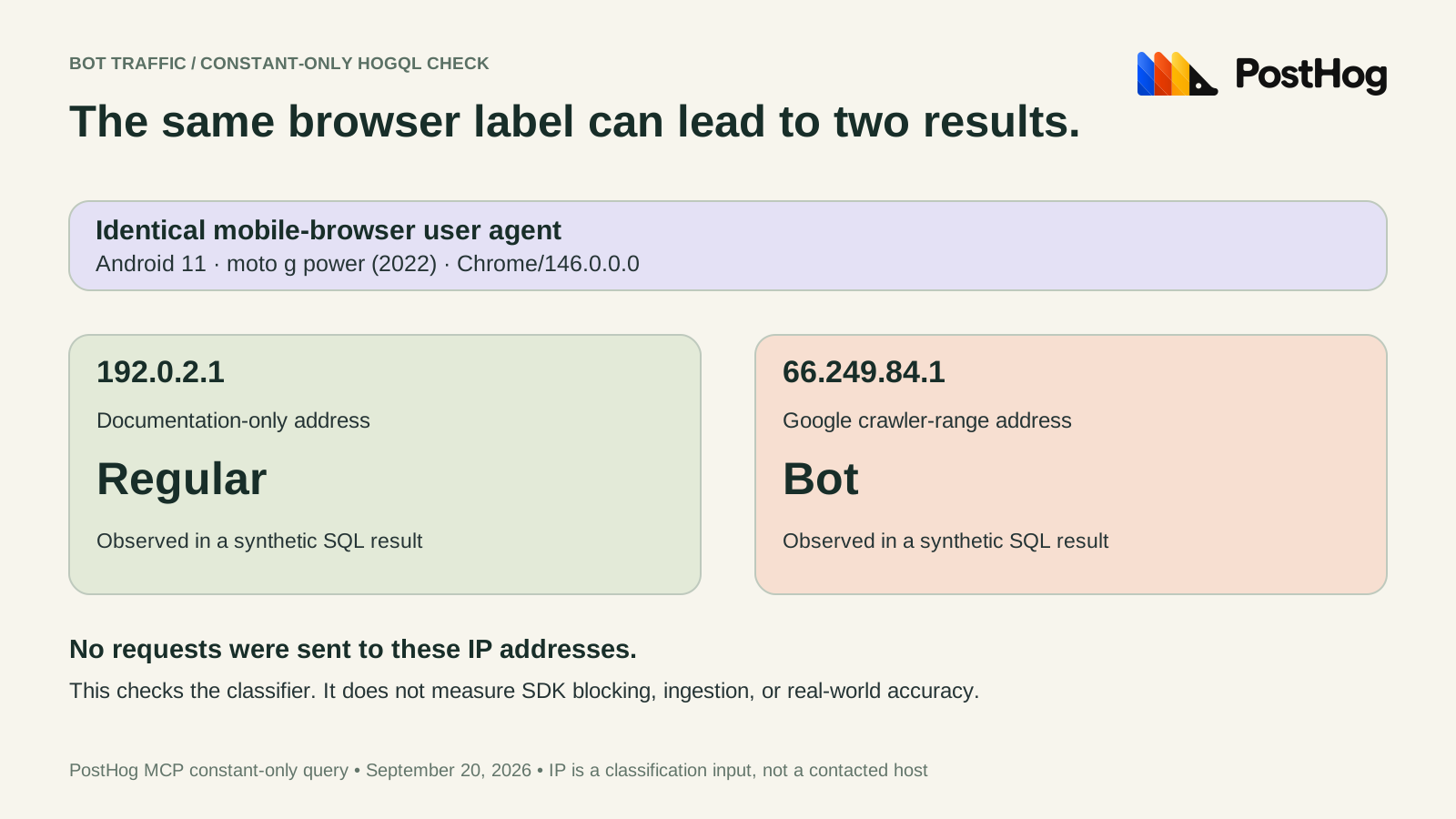
We ran six synthetic cases through the live execute-sql capability on September 20, 2026. Every input was an inline constant. The query did not read an analytics table or insert an event.
| Case | IP input | isLikelyBot | Traffic type |
|---|---|---|---|
| Ordinary Safari user agent | 192.0.2.1 | false | Regular |
| Googlebot user agent | 192.0.2.1 | true | Bot |
| Android browser user agent | 192.0.2.1 | false | Regular |
| Same Android user agent | 66.249.84.1 | true | Bot |
| Empty user agent | 192.0.2.1 | true | Automation |
| curl user agent | 192.0.2.1 | true | Automation |
The paired Android rows isolate the IP input. This checks the deployed classification function for these constants. It does not establish a false-positive rate, test the browser SDK, or prove that your ingestion pipeline retained the IP needed for classification.
Copy the full query into your SQL editor or a verified read-only MCP session:
SELECT case_name, isLikelyBot(ua, ip) AS likely_bot, getTrafficType(ua, ip) AS traffic_type FROM (
SELECT 'browser_test_ip' AS case_name, 'Mozilla/5.0 (Macintosh; Intel Mac OS X 10_15_7) AppleWebKit/605.1.15 Version/18.0 Safari/605.1.15' AS ua, '192.0.2.1' AS ip
UNION ALL SELECT 'googlebot_ua', 'Googlebot/2.1 (+http://www.google.com/bot.html)', '192.0.2.1'
UNION ALL SELECT 'browser_google_ip', 'Mozilla/5.0 (Linux; Android 11; moto g power (2022)) AppleWebKit/537.36 (KHTML, like Gecko) Chrome/146.0.0.0 Mobile Safari/537.36', '66.249.84.1'
UNION ALL SELECT 'browser_mobile_test_ip', 'Mozilla/5.0 (Linux; Android 11; moto g power (2022)) AppleWebKit/537.36 (KHTML, like Gecko) Chrome/146.0.0.0 Mobile Safari/537.36', '192.0.2.1'
UNION ALL SELECT 'empty_ua', '', '192.0.2.1'
UNION ALL SELECT 'curl_ua', 'curl/8.0.1', '192.0.2.1'
) ORDER BY case_name
The address 192.0.2.1 is a documentation-only control, not a real visitor address. The Google-range example comes from the historical investigation. Keep these synthetic values out of production event capture. Save the query, result, date, and project context when you repeat the check, since classifier definitions can evolve.
Before dropping events, test the collection path
For a collection change, create a small test page under your control and enumerate the actual producers: browser SDK, server SDK, reverse proxy, or log forwarding. Record which producer is expected to emit each event. A browser-only rule cannot establish what a separate server integration sends.
The JavaScript configuration reference documents before_send for inspecting, editing, or dropping an event before sending it, and custom_blocked_useragents for additional user-agent exclusions. Use the smallest rule that matches an observed, understood source. Avoid copying a broad device or country rule into production.
A useful acceptance worksheet has one row per case: input, expected collection decision, observed network request, accepted event readback, and report result. Include a real-browser control, your own monitoring client, and the suspected automation. Also repeat the test through each server-side producer you use.
Check collection and reporting separately. “No matching row in this filtered insight” is weaker evidence than an inspected outbound payload plus the unfiltered destination stream. Conversely, a network request alone does not prove the destination accepted an event. Record both observations before concluding that a rule works.
Measuring crawlers can increase the data you collect
Many crawlers do not execute your JavaScript. Their absence from browser pageviews does not mean they never requested the site. PostHog documents forwarding access logs as $http_log events to observe those requests. This adds collection rather than making browser pageviews more complete. Server-side capture and identity guidance also covers person processing and distinct IDs.
Keep request counts and visitor counts separate in your plan. One shared identifier collapses distinct clients; a fresh identifier for every request makes every request look distinct. Before adding logs, write down the metric you want, the data you are allowed to retain, the identity rule, and the volume you expect. Do not add a log stream solely to make a bot filter available.
For cost planning, compare accepted volume and the relevant billing usage before and after the collection change. A dashboard exclusion alone supplies no ingestion-savings evidence. Our free-plan comparison explains why the billing unit matters; it is a separate decision from whether a row belongs in a human-traffic chart.
If you already inspect your projects in Hogly, the multi-project overview helps you keep project context visible. Hogly is our independent client, not the source of PostHog’s bot classifications. The diagrams use the official PostHog logo only to identify the platform; no endorsement is implied.
Quick answers
Frequently asked.
Does filtering bots out of PostHog reduce my bill?
A query filter changes which stored rows count in a report. It does not prove that fewer events were captured. Verify collection volume and the applicable billing usage separately.
Why can a normal browser user agent be classified as a bot?
A known crawler can send a normal-looking browser user agent. Our synthetic check returned different classifications for the same user agent when only the IP changed.
Does disabling browser capture stop crawlers visiting my site?
No. Browser analytics collection and website access are separate layers. Verify website request handling at your edge or origin.
Can I reuse the SQL test without sending fake events?
Yes. The query uses inline constants and returns classification results without inserting events. Confirm your PostHog project and inspect the query before running it.