
Choose a free analytics plan by the first limit your workflow will hit. Amplitude currently has the largest free event allowance of these three; Mixpanel and Amplitude include more monthly replays than PostHog. But events and recordings are only part of the decision: saved reports, experiment exposure, retention, and what happens at the cap can determine whether the plan works for your team.
The short version
- Budget events, recordings, flag requests, and experiment users separately; they are different units.
- A plan that starts at $0 with a card can behave differently from a no-card Free account.
- Use the worked examples as a worksheet, then check your own billing meter and required reports.
Compare the current public plans, not an old contract
Official sources checked September 20, 2026. This guide compares publicly offered cloud plans. It does not cover negotiated contracts, self-hosting costs, startup credits, or a paid-plan trial. Existing accounts may have different terms. We checked documentation and public pricing pages, not three live customer invoices or account-level performance.
We make Hogly, an independent PostHog client, so we have a commercial interest in the PostHog ecosystem. The comparisons below allow for choosing any of the three platforms. Hogly is optional, and any Hogly purchase is separate from the analytics provider's charges.
Start with one decision you need to make: which signup step loses users, whether new customers return, or why a customer could not finish checkout. Write down the report, evidence, and sharing workflow that answer it. Then check whether the free plan can sustain that workflow.
What is included without a credit card?
| Limit | PostHog | Mixpanel | Amplitude |
|---|---|---|---|
| Analytics events | 1 million | 1 million | 2 million |
| Session recordings | 5,000 | 10,000 | 10,000 |
| Flags / experiments | 1 million flag requests; experiments use flag billing | 10 active flags; 1,000 monthly experiment users | Unlimited flags; 1 active feature experiment and 1 active web experiment |
| Team seats | Unlimited | Unlimited | Unlimited |
| Saved analysis | No numeric saved-report cap confirmed in the cited pricing page | 5 saved reports per seat | 10 saved charts per organization |
| Replay retention | Up to 30 days | 30 days | 1 month |
Sources: PostHog pricing, Mixpanel pricing, Amplitude pricing, and PostHog replay retention. These figures describe allowances, not equivalent SDK behavior or analytical depth.
PostHog's Free plan lists one project and one-year data retention; adding a card enables six projects and longer data retention. Amplitude lists one-year data access on Free. Neither headline should be read as a promise to keep session recordings for a year: replay has its own retention window.
We did not establish a complete, comparable set of Free project caps and event-retention terms for Mixpanel and Amplitude from these sources. Confirm the missing terms for your account before separating production and staging or planning a historical import. An unspecified limit is not an unlimited entitlement.
Unlimited seats also do not guarantee the permission model or support response you need. Try sharing the actual report with a teammate, and check access controls and support terms separately before choosing a plan.
Four counters that should never share one budget
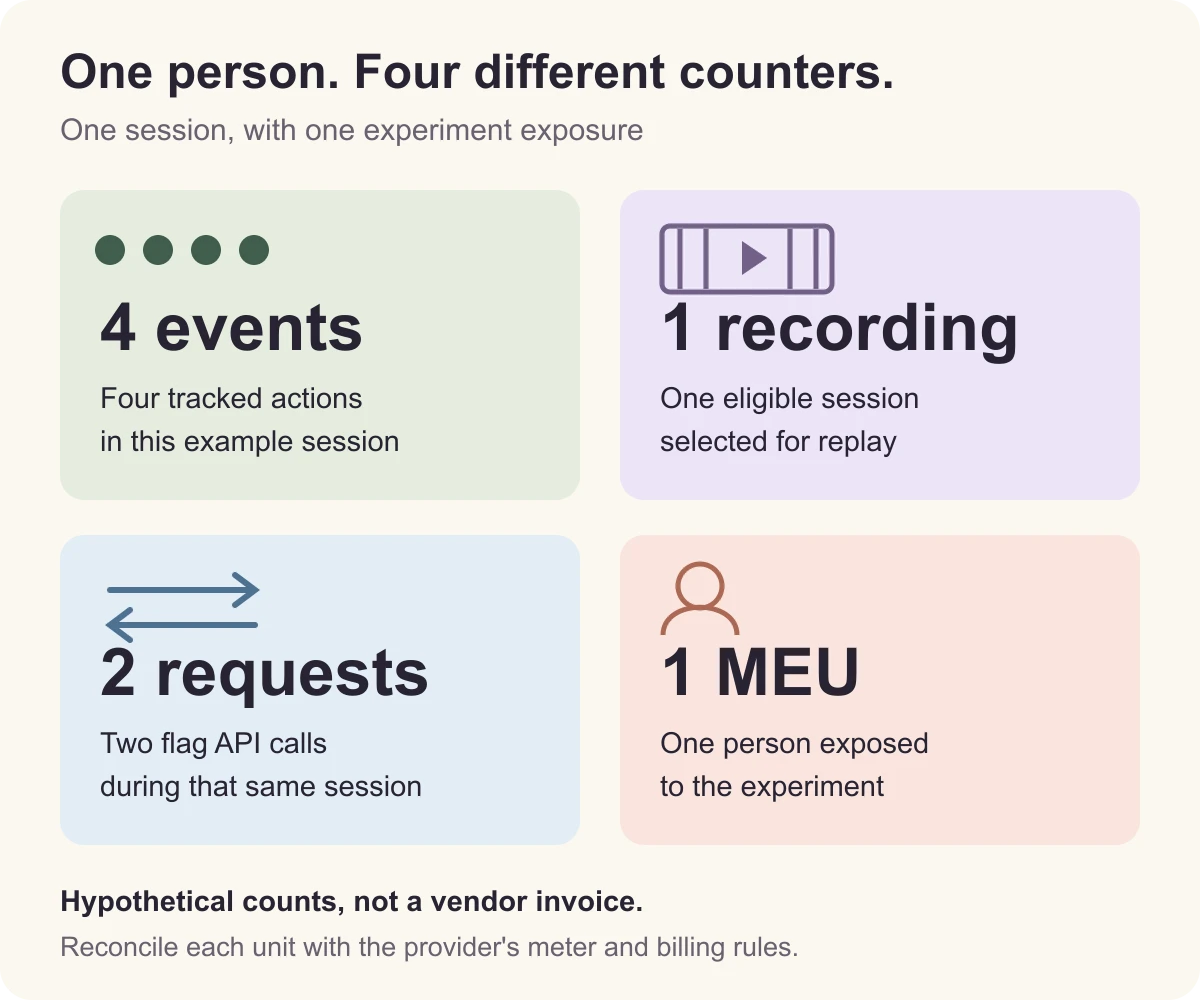
Events describe recorded actions. Replays describe recorded sessions. Flag requests describe evaluations requested by an implementation. Experiment users describe people exposed to tests. A product with few users can still generate many events or flag requests.
Mixpanel defines a monthly experiment user (MEU) by experiment exposure, not merely by an app visit. Its documentation also describes an adjustment when average exposure exceeds 30 experiments per user. Flag API requests are unlimited when flags are included with Experiments, while active flag keys remain limited. See the experiment billing definition and feature flag limits.
For event estimates, count the actions your implementation actually sends. Autocapture, page or screen events, experiment exposure, backend notifications, and duplicate client/server reporting can all change the total. Vendor billing exclusions can also differ; Mixpanel, for example, excludes several identity and profile operations from its event meter. Use its billing documentation to reconcile the meter rather than assuming every API request is a paid event.
Amplitude's public Free offer is event-based, but its documentation also covers MTU contracts. An MTU is a monthly tracked user, not one event. Read the unit on your own subscription before applying an online comparison. The MTU guide explains that separate billing model.
Three workloads: calculate the pressure before the bill
All inputs below are hypothetical. They are planning examples, not observed customer traffic, SDK benchmarks, or invoice estimates. Assume one production project, no historical imports, and the same intended event set. For this worksheet, the event totals mean billable product events from client and server sources; experiment exposure events covered by Mixpanel Experiments are excluded from its regular event meter. Track those exposures separately when reconciling providers. Flag-request counts are independent inputs, not a multiple of the number of flags.
Use these starting formulas: events = active users × average events per user; recordings ≈ eligible sessions × recording sample rate. Actual recording counts depend on session definitions and capture rules. Each example uses at most one feature experiment, no web experiment, and no more than five active flag keys.
| Input / result | Small SaaS | Busy web product | iOS subscription app |
|---|---|---|---|
| Active users × events | 2,000 × 100 | 5,000 × 300 | 10,000 × 80 |
| Billable events after exclusions | 200,000 | 1,500,000 | 800,000 |
| Sessions × replay sample | 10,000 × 20% | 40,000 × 20% | Replay disabled |
| Expected recordings | 2,000 | 8,000 | 0 |
| Flag API requests | 20,000 | 200,000 | 60,000 |
| Users in one feature experiment | 500 | 900 | 2,000 |
Small SaaS: the modeled usage is below the listed volume caps. Your next constraint may be the working report set. Ask each teammate to save the charts they use weekly; a generous event allowance does not solve a report-storage constraint.
Busy web product: the inputs exceed PostHog's free event and recording allowances by 500,000 events and 3,000 recordings. They exceed Mixpanel's event allowance by 500,000, while fitting its recording and experiment-user caps. They fit Amplitude's listed event, recording, and active-experiment allowances. This makes Amplitude a reasonable first candidate for this particular workload, subject to report and feature requirements.
iOS subscription app: the event volume fits all three, but 2,000 exposed users exceed Mixpanel's 1,000-MEU Free allowance. The example intentionally excludes native replay: verify your exact SDK, UI framework, capture behavior, and privacy settings before adding it to the budget. Low event usage alone does not establish that an experimentation workflow is free.
For the busy web example, fitting 40,000 eligible sessions into 5,000 recordings implies a sample rate of at most 5,000 ÷ 40,000 = 12.5% under these assumptions. That changes the evidence available for debugging and does nothing to reduce the 1.5 million analytics events. Treat sampling as a product decision, not a substitute for tracking the events that define your funnel.
What happens when you reach the free limit?
- PostHog: the no-card plan stops usage at its free limits. Pay-as-you-go keeps monthly free allowances and adds product-specific billing limits. Check the relevant product before assuming data continues to arrive. See the Free and pay-as-you-go terms.
- Mixpanel: its event-pricing documentation says Free report access is blocked at the monthly limit until an upgrade or the next reset; Free event overages are not charged. Experiments have a separate cap and pause on Free when the MEU allowance is exceeded, while feature flags keep serving. See event overages and experiment overages.
- Amplitude: the public offer separates no-card Free from card-required Plus. We did not verify the exact ingestion-versus-report-access behavior at the current 2-million-event Free cap. Confirm it in your account before depending on uninterrupted collection. The billing FAQ discusses paid-plan overages and startup terms; those are not a substitute for a verified Free enforcement rule.
Do not copy the default dollar total from three pricing calculators. Their selected volumes, billing periods, and add-ons may differ. For an upgrade comparison, enter the same event and replay volumes, select the same monthly or annual commitment, and record the currency, taxes, overage rates, and cancellation terms. The worksheet above identifies pressure points; it does not calculate a paid invoice.
Watch the workflow before committing
A demo is useful for seeing the interface and vocabulary before building your test report. These are vendor demonstrations, not evidence that every shown feature is included in a current Free plan:
- PostHog: What is PostHog? (Official Demo & Tutorial) — a tour of the platform to help you decide which tools your evaluation actually needs.
- Mixpanel: What Is Mixpanel? | Product Demo — an introduction to exploring product questions. This older official video is background material; use the current pricing sources above for plan limits.
- Amplitude's official online demo — an overview of its analytics workflow before trying your own activation question.
While watching, note how you would create the same funnel, inspect the underlying users, and share a saved report. Then verify that path in the plan and SDK you intend to use. The worksheet and comparison here remain usable without watching any video.
Choose with one real question and a week of data
- Write a minimal event dictionary. Give each event one meaning and one owner. For an activation question, start with signup, the first useful action, and a return action. Add other events because they answer a question, not because an allowance is available.
- Measure the busiest plausible month. Include staging, backend events, campaigns, and imports where they contribute to billing. A weekly average may hide a launch-day spike; leave room for it.
- Build and share the same report. Keep the identity rules, date window, time zone, and conversion window consistent. Ask a teammate to interpret it without your explanation.
- Inspect each meter. Record event volume, recordings, experiment exposure, active flags, and saved reports separately. Explain any difference between the estimate and the provider's usage screen.
- Write the upgrade trigger. Decide which missing capability or approaching limit would justify paying, and who checks it. Do this before the reporting workflow becomes operationally important.
If you choose PostHog and want to check it from an iPhone, our mobile PostHog workflow explains where Hogly fits. For subscription apps, the acquisition-to-revenue guide covers the next question: connecting behavior and subscription events after you have chosen and configured the analytics backend.
Quick answers
Frequently asked.
Can I use a free analytics plan for a production app?
Yes, provided your account's terms, usage limits, and available features fit the app. Validate your critical reports and decide how to respond before a limit interrupts the workflow. A small user count alone is not enough to establish that fit.
Does reducing session replay sampling reduce analytics events?
Do not assume it does. Recording selection and analytics instrumentation are separate controls. In the worked web example, reducing replay sampling to 12.5% targets 5,000 recordings while leaving the modeled 1.5 million analytics events unchanged.
Can I use these examples to forecast a paid invoice?
No. They identify which free allowances a hypothetical workload would pressure. A paid estimate also needs your actual contract, billing units, add-ons, commitment period, currency, taxes, and overage rules. Reconcile a sample of real traffic with the provider's billing meter first.