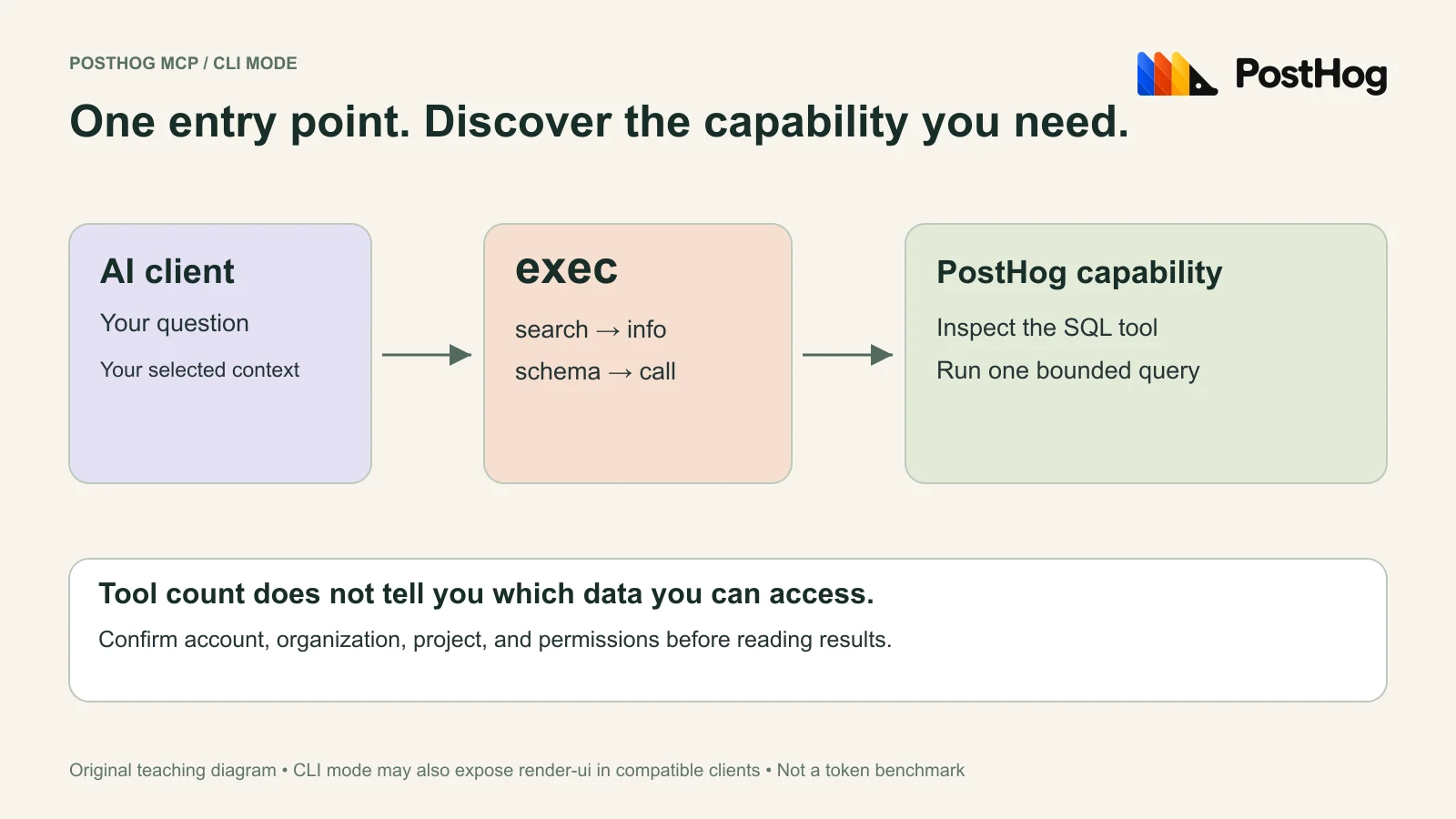
Seeing only exec in PostHog MCP can be normal. CLI mode exposes one discovery-and-execution entry point instead of registering every capability separately. Check the mode, confirm the organization and project, then run a small query whose answer you can verify without trusting the assistant’s explanation.
The short version
- CLI mode discovers capabilities through exec; a short visible tool list does not prove the connection is broken.
- Mode, permissions, and project context are separate checks. A successful query can still target the wrong project.
- Our first-query fixture returned 2 in PostHog MCP and independently in SQLite; it measures correctness, not token savings.
Why you see exec instead of a long tool list
Checked September 20, 2026. This guide combines current documentation with a real MCP discovery sequence and a constant-only SQL check. We did not read customer events, compare model performance, or measure token savings.
PostHog’s MCP FAQ describes CLI mode as an exec entry point that discovers capabilities on demand; tools mode exposes capabilities individually. Compatible clients may also receive render-ui. The server chooses a mode based on the client, with mode=cli or mode=tools available as overrides.
An August 2026 user discussion captures the confusion when a small tool list replaces an older expectation. The useful diagnostic is whether discovery and a permitted call work, not whether your tool picker contains a particular number of entries. Claims about costs in a community thread are not our benchmark.
Our connected client advertised exec, and its discovery command found execute-sql. That is direct evidence of the distinction: a capability can be callable without appearing as a separate top-level tool.
Use the current setup guide for your client
If you have not connected yet, start with the official MCP overview. For Claude Code, PostHog documents this manual connection command:
claude mcp add --transport http posthog https://mcp.posthog.com/mcp -s userComplete authentication in the account you intend to use, following the Claude Code setup guide. A connection made for another account or region is a different context. If your client is already connected, inspect its existing configuration before adding another entry and creating an ambiguous pair of connections.
For an initial read-only session, the FAQ documents readonly=true; project pinning is available through project_id. This example endpoint combines an explicit mode and read-only restriction:
https://mcp.posthog.com/mcp?mode=cli&readonly=trueA sentence asking an agent not to write is a workflow instruction. A server-side read-only setting is an additional configuration choice. Verify the tools actually offered by the connection you use. Do not broaden permissions merely because an unrelated capability is absent.
Discover the capability, then read its schema
The command strings below go inside the connected PostHog exec tool’s command argument. They are not shell commands. Client wrappers may expose additional fields or a prefixed tool name; follow the advertised schema.
search execute-sql
info execute-sql
In our test, search found the SQL capability and info exposed a required string named query. If an inspected tool includes a hint to drill into a complex field, use the advertised schema command before constructing that field. The official tool reference is useful for discovering names, but the connected schema is the contract for your call.
Our connection also advertised a skill-discovery command, learn, that returned “not available for this client.” We recorded that limitation and continued with the supported search and info commands. This observation applies to the tested client; it does not establish that the command is unavailable everywhere.
Keep a short call log: command, success or error, selected capability, and schema fields used. If discovery works but a call fails, preserve the actual error. An unknown field, missing permission, and expired authentication require different fixes.
Confirm context before a useful query
Before our SQL call, we used the discovered organization-get and project-get capabilities and checked the returned names and IDs against the intended project. We did not assume that the last project mentioned in a conversation was still active.
One connection has an active account, organization, and project. The context and pinning reference explains switching and pinning. For a repeatable investigation, write your expected context in the request, then compare it with the returned metadata before running the query.
| Field | What to record |
|---|---|
| Target | Account or connection label, organization, project, and region. |
| Question | The exact thing being counted; events, people, and sessions are different units. |
| Window | An explicit start and exclusive end, plus timezone for real timestamps. |
| Scope | Event name, environment, internal-traffic exclusions, and relevant properties. |
| Evidence | Final query, raw result, and a second calculation using the same definition. |
Keep configuration responses out of public examples: they can contain tokens, settings, or identifiers unnecessary to explain the result. Our published evidence retains only the constant query and its returned count.
Hogly’s multi-project workflow addresses the same practical need to keep context visible. It does not select or authorize an MCP project for you.
Run this six-row query and expect two
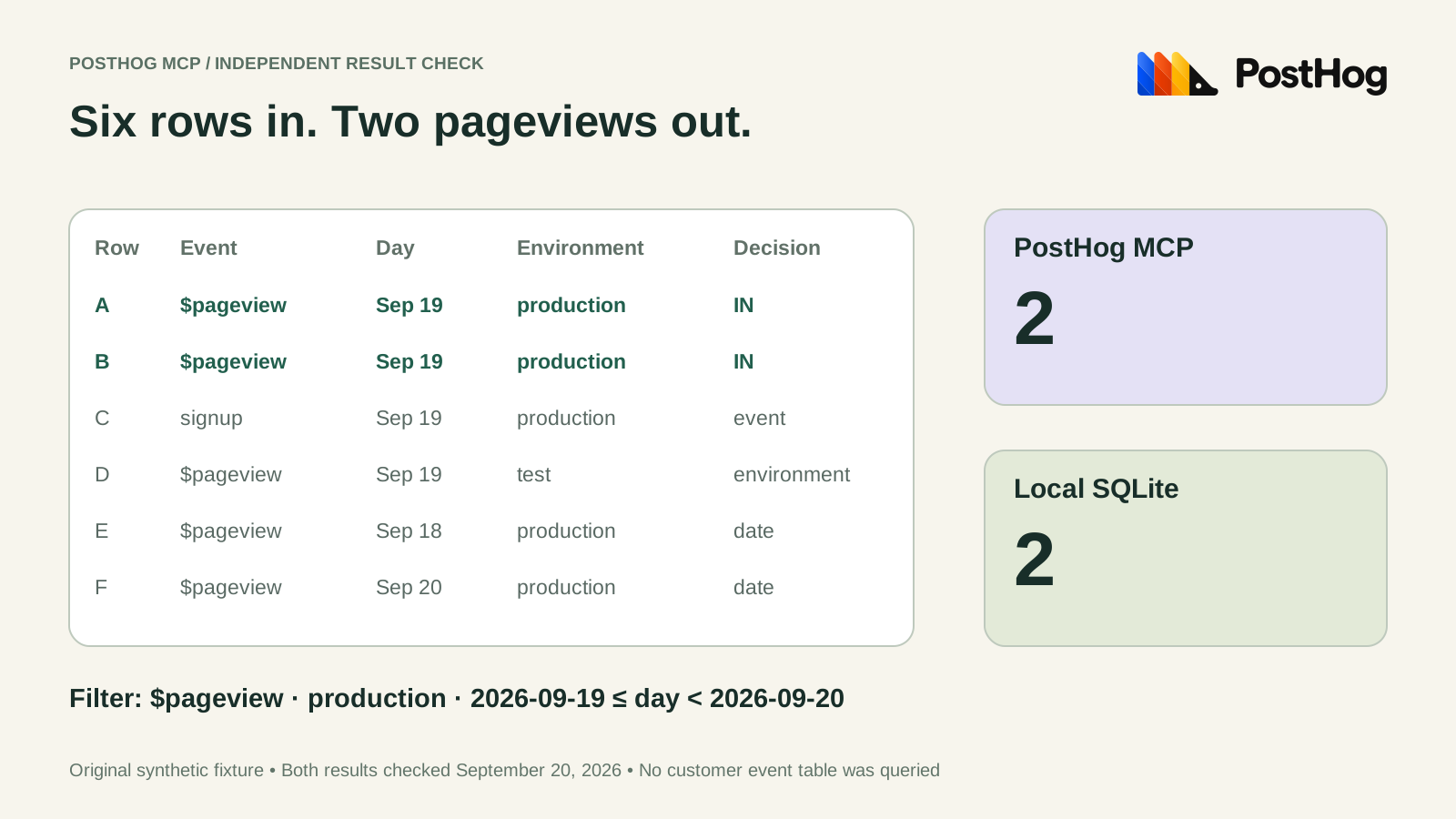
This synthetic fixture has six rows: two production pageviews on September 19, one signup, one test pageview, and two pageviews outside the selected day. It uses sortable ISO date strings deliberately, so it tests filtering and transport without introducing timezone conversion. It does not test timestamp bucketing.
SELECT count() AS pageviews FROM (
 SELECT '$pageview' AS event, '2026-09-19' AS day, 'production' AS environment
 UNION ALL SELECT '$pageview', '2026-09-19', 'production'
 UNION ALL SELECT 'signup', '2026-09-19', 'production'
 UNION ALL SELECT '$pageview', '2026-09-19', 'test'
 UNION ALL SELECT '$pageview', '2026-09-18', 'production'
 UNION ALL SELECT '$pageview', '2026-09-20', 'production'
) WHERE event = '$pageview' AND day >= '2026-09-19' AND day < '2026-09-20' AND environment = 'production'
Ask the agent to pass this exact SQL as the inspected tool’s query string. In our connected CLI mode the call shape was call execute-sql {"query":"…"}. Serialize the complete SQL as JSON rather than assembling an invalid multiline JSON string by hand.
Observed PostHog result: pageviews = 2. We independently executed the same SQL in Python’s standard-library SQLite and received [(2,)]. You can repeat the independent check by saving the SQL above as first-query.sql:
python3 - <<'PY'
import pathlib, sqlite3
sql = pathlib.Path('first-query.sql').read_text()
rows = sqlite3.connect(':memory:').execute(sql).fetchall()
assert rows == [(2,)], rows
print(rows)
PY
Agreement proves a limited but useful claim: this connection executed the inline filtering query and returned the independently expected answer. It does not validate your event instrumentation, production permissions, identity merges, report defaults, or every SQL dialect feature.
Move from a fixture to one bounded production question
Once the fixture works, choose a question with a known reference: for example, the count of one verified event during one completed hour. Ask the agent to discover the table, event, and property schema before writing the query. Use your team’s existing approved metric definition when one exists.
Ask for the final query and raw result, not just a prose answer. Open the same project in PostHog and reproduce the calculation with the same filters. Compare counts only after checking whether the reference report applies internal-user exclusions, groups people, uses sessions, or converts timestamps.
When results disagree, change one assumption at a time. First confirm context, then the time interval, then the event and environment filters, then the unit of aggregation. Avoid asking the model to “make the number match”; that rewards an unexplained change in the question.
For a more involved calculation, our activation-funnel worksheet shows why user and workspace grain produce different legitimate results. A tool connection cannot resolve an undefined metric for you.
Keep correctness and cost evidence separate
We did not measure tokens, latency, or money in this test. A small top-level schema can be helpful, but discovery responses, query output, client caching, retries, and the model’s own reasoning all affect a complete run.
If you compare CLI and tools mode, hold the client, model, account permissions, question, query, and output shape constant. Save the measured input and output tokens, wall-clock time, retry count, and whether the answer passed the same independent check. Repeat under comparable cache conditions. Report the actual sample instead of adopting a percentage from someone else’s workload.
PostHog’s billing explanation separates the MCP connection from underlying usage and AI-powered capabilities. Your AI client’s charges are another item to inspect. “The tool call worked” and “the complete workflow is free” are different conclusions.
We make Hogly, an independent PostHog client. This guide uses PostHog’s official logo for identification and does not imply endorsement. Hogly is optional; the verification method works with a supported MCP client and an independent SQL calculation.
Quick answers
Frequently asked.
Is it normal for PostHog MCP to show only exec?
Yes, that can be CLI mode. Test capability discovery through the connected tool. A long list of separately registered tools is a different mode, not a prerequisite for a working connection.
Are search and info terminal commands?
In this guide they are strings passed to the PostHog exec tool, not commands to paste into your operating-system shell. Follow your client’s advertised wrapper schema.
What does the first-query result prove?
Our inline six-row query returned 2 through MCP and independently through SQLite. That verifies this query and its result, not production event collection or all report semantics.
Does CLI mode guarantee lower AI costs?
We did not benchmark costs. Compare complete runs under the same model, client, question, permissions, output size, and cache conditions before making a savings claim.