Yes. Hogly lets you open PostHog Person profiles and inspect user activity on iPhone. Begin with the correct project and identity, then distinguish what the profile says now from what each event recorded at the time.
The short version
- A person profile, an event, and a session recording provide different kinds of evidence.
- Search within the right project; a display name alone is not a reliable identity.
- No matching result, missing permission, and no captured activity require different next steps.
Can I inspect a person instead of just counting events?
Yes. Hogly includes a People search and Person detail view with properties and recent activity. This is useful when the question has moved from “How many users converted?” to “What happened to the person who just contacted us?” You can examine individual context without turning the whole investigation into an aggregate dashboard.
Where data and access are available, related recordings and Support conversations add context. These are separate records: a person can have events without a usable replay, and a support message may require additional identity matching. Opening a profile does not guarantee that every related system has a matching entry.
Reviewed October 16, 2026. The worked example is fictional; it illustrates how to read evidence, not an incident observed in a customer account.
How do I find the right user on my phone?
First confirm the PostHog host and project. Search for an identifier you know is recorded in that project, such as the person's email or user identifier where available. Open the result and check its identity and properties before treating it as the customer you intended.
Do not rely on a display name alone. Two people can share a name, the same person can exist in separate projects, and an anonymous identifier may not look like a customer account. PostHog's People documentation describes how profiles and distinct IDs relate. A mobile client cannot reconstruct an identity association your analytics setup never captured.
If you are browsing recent users rather than searching, check the selected date range, population, and test-user filters. Someone missing from a recent activity list may still have a profile. If a broader search fails, first separate “the project could not be queried” from “the query succeeded without a match.”
Why does the current profile disagree with an older event?
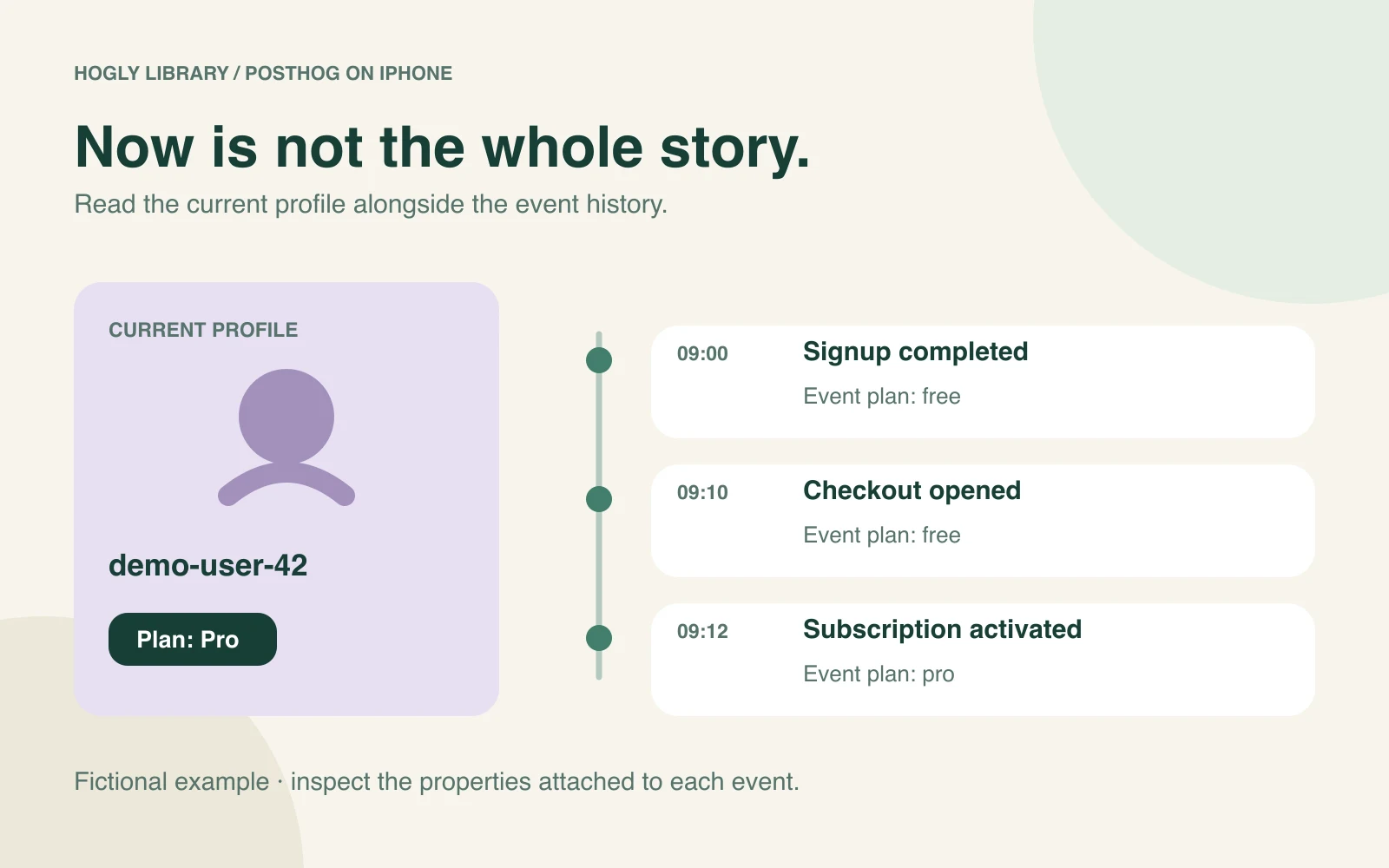
They can both be correct. A profile describes the current properties associated with a person. An event can carry properties captured when a particular action occurred. Reading today's profile value as though it were the value on every past event can produce a false explanation.
Consider this fictional history for demo-user-42:
- 09:00:
signup_completedhas event propertyplan: free. - 09:10:
checkout_openedalso hasplan: free. - 09:12:
subscription_activatedhasplan: pro; the profile is updated to Pro.
At 10:00, the profile saying Pro does not make the 09:10 event wrong. Read the event timestamp and its own properties when asking what happened at checkout. Conversely, a historical purchase-related event alone does not prove that a subscription is still active now.
These names are illustrative. Use your own event definitions, and do not assume a property was captured merely because it appears in this example. For a real billing decision, consult the payment system's current record as well as analytics context.
What should I look for in the activity history?
Begin with the time of the customer's report, then read nearby events in sequence. Note the event name, timestamp, relevant properties, and identity. Ask a narrow question: did the application record the action before the failure, and what context accompanied it?
For example, checkout_opened can show that a screen opened. It does not by itself establish a completed purchase. A button-click event can show intent without proving that the backend accepted the request. Prefer event definitions that distinguish those outcomes, and retain uncertainty where the tracking stops.
A gap is a starting point for investigation. Check the time range, ingestion delay, test-account exclusions, and which identity the action used. Avoid merging or editing identities merely to make a missing row appear. First compare the same user and time window in PostHog web.
Why are properties, activity, or replays missing?
Treat each missing surface separately. A profile could be unavailable because the connection lacks access; an event list could be outside the selected time range; a replay may never have been recorded or may no longer be retained. An empty panel cannot identify the cause by itself.
- Wrong project or identity: verify the host, project, and known identifier.
- Permission or connection failure: review the connection and the access required for that feature.
- Profile mismatch: inspect whether anonymous and identified activity belong to the expected person.
- No relevant event: confirm that the application actually sends that event.
- No replay: check recording availability separately from event capture.
PostHog's anonymous and identified event guidance provides additional identity context. For Hogly's credential and data-flow details, see the privacy and permissions guide.
How do I turn the evidence into a useful next step?
Write down what the record establishes and what remains unknown. “The customer opened checkout at 09:10” is stronger than “payments are broken” when that is the only event you have. If a related recording exists, inspect it to understand the experience around the event. If the evidence points to a missing integration event, investigate that capture path.
Use the existing Support reply workflow when you need to answer the customer, or the RevenueCat-to-Person guide when the investigation started with a payment. Confirm the exact person and conversation before sending anything.
To move back to the aggregate question, read the dashboard and funnel guide. If you are evaluating mobile clients, the iPhone app checklist helps you decide whether these person-level workflows are part of what you need.
Quick answers
Frequently asked.
Can I see PostHog Person properties in Hogly?
Yes. Hogly includes Person profiles and properties, subject to available data and your connection permissions.
Does a current Pro property mean every past event happened on Pro?
No. Read the properties attached to the historical event. The person profile may have changed since that event occurred.
Does no replay mean the person did not use my product?
No. Event capture and replay availability differ. A recording may not have been captured, retained, or accessible to the current connection.