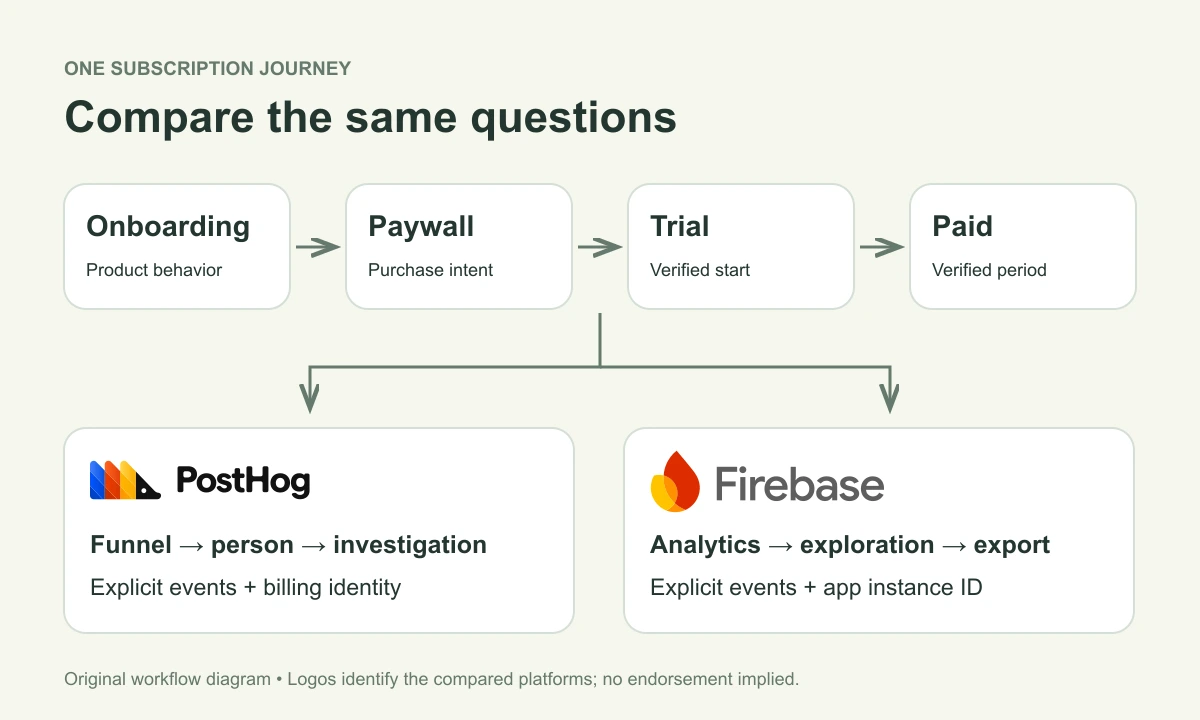
Keep Firebase Analytics if your team already answers its acquisition, onboarding, and subscription questions in Google Analytics and BigQuery. Evaluate PostHog when connecting a product funnel to a person’s event history and an iOS session replay would change how you investigate problems. Either way, the difficult part is agreeing on identities and verified subscription events—not installing another SDK.
The short version
- Compare PostHog with Google Analytics for Firebase; changing analytics does not require replacing Firebase Auth, Firestore, or Crashlytics.
- Use one event dictionary, but preserve each destination’s identity rules and subscription-event mapping.
- Measure trial conversion from verified billing events and a mature trial cohort, not purchase-button taps.
The question is one subscription journey
Official documentation checked September 20, 2026. This is a documented workflow comparison and a reusable evaluation worksheet. We did not run a two-SDK SwiftUI benchmark, time ingestion, or make test purchases for this article. SDK versions and account-specific behavior therefore remain checks for your own pilot.
Our example is a SwiftUI app with onboarding, a paywall, a seven-day trial, and a paid subscription. The question is: Which onboarding path leads to a first paid period, and what happened to people who stopped before subscribing? Firebase here means its Google Analytics integration. Authentication, database storage, crash reporting, and notification delivery are separate decisions.
We make Hogly, an independent PostHog client, and have a commercial interest in the PostHog ecosystem. This comparison includes reasons to keep Firebase Analytics. Hogly is optional and does not change either provider’s collection or billing behavior.
Where the two workflows differ
| Task | PostHog | Firebase Analytics / Google Analytics |
|---|---|---|
| Inspect an event | Capture deliberate product events, then investigate events and identified people. | Validate development-device events in DebugView; use Google Analytics reports for analysis. |
| Build the funnel | Use a funnel insight with event steps, filters, and a conversion window. | Use Google Analytics 4 Funnel exploration; do not look for the retired Firebase-only Funnels screen. |
| Follow a returning user | Frontend identify links an anonymous identity to an identified person; coordinate the backend ID. | Set a user ID for future events. Earlier exported events are not retroactively assigned that ID. |
| Investigate the interface | Optional iOS Session Replay has its own setup and masking work; SwiftUI requires screenshot mode. | This comparison uses Analytics events and reports; it does not assume a session recording is part of Analytics. |
| Understand paid status | Join a verified subscription event stream to product behavior. | Join a verified subscription event stream to product behavior. A Firebase backend alone does not establish the join. |
References: PostHog funnels, GA4 Funnel exploration, Firebase reporting changes, and PostHog iOS Replay setup. These are available workflows, not measured claims that one interface is faster.
Start with an event dictionary you can reuse
Define the meaning of each step before translating it into SDK calls. The following names are an original proposed schema, not a list of automatically collected events. Emit each client event from one owner in the app. SwiftUI view reappearance should not silently turn one paywall exposure into several impressions.
| Logical event | When it becomes true | Owner and useful fields |
|---|---|---|
| onboarding_completed | The user finishes the defined onboarding flow. | App: flow_version, completion_path, app_version. |
| paywall_viewed | A particular paywall presentation becomes visible. | App: paywall_id, placement, presentation_id. Define when a repeat view counts. |
| purchase_requested | The user asks StoreKit to start a purchase. | App: product_id, presentation_id. This measures intent, not payment. |
| trial_started | A verified subscription transaction begins a trial period. | Billing pipeline: customer mapping, transaction/event ID, product_id, environment, period start. |
| first_paid_period_started | A verified first paid subscription period begins, either directly or after a trial. | Billing pipeline: distinguish direct purchase from trial conversion; retain amount and currency. |
| subscription_renewed | A subsequent paid period begins. | Billing pipeline: transaction/event ID, product_id, environment, period start. |
Keep a provider mapping beside this dictionary. For example, a RevenueCat PostHog trial start defaults to rc_trial_started_event, while its Firebase integration defaults to rc_trial_start. A logical first-paid step may require an event plus a filter rather than one identically named event in both tools. Do not add a second revenue-bearing event just to make the names match.
Keep production and sandbox distinguishable. Retain verified transaction identifiers in the billing pipeline for reconciliation, and pass only the fields you need into analytics. Do not place receipt contents or payment details in event properties.
A user ID and an app instance ID solve different problems
Use a stable opaque account ID when one exists. Firebase’s user-ID documentation says the value tags future events and does not change previously recorded events. It also prohibits personally identifiable values such as an email address. For an export-based anonymous-to-account analysis, explicitly define how earlier user_pseudo_id rows connect to the account; setting an ID today is not a historical backfill.
PostHog’s identify flow links the current anonymous person with the identified person. Backend events still need the same distinct ID. Reset the PostHog identity when an account logs out; clear or update account identity in every other analytics destination too. Test account switching instead of assuming one SDK’s reset controls another SDK.
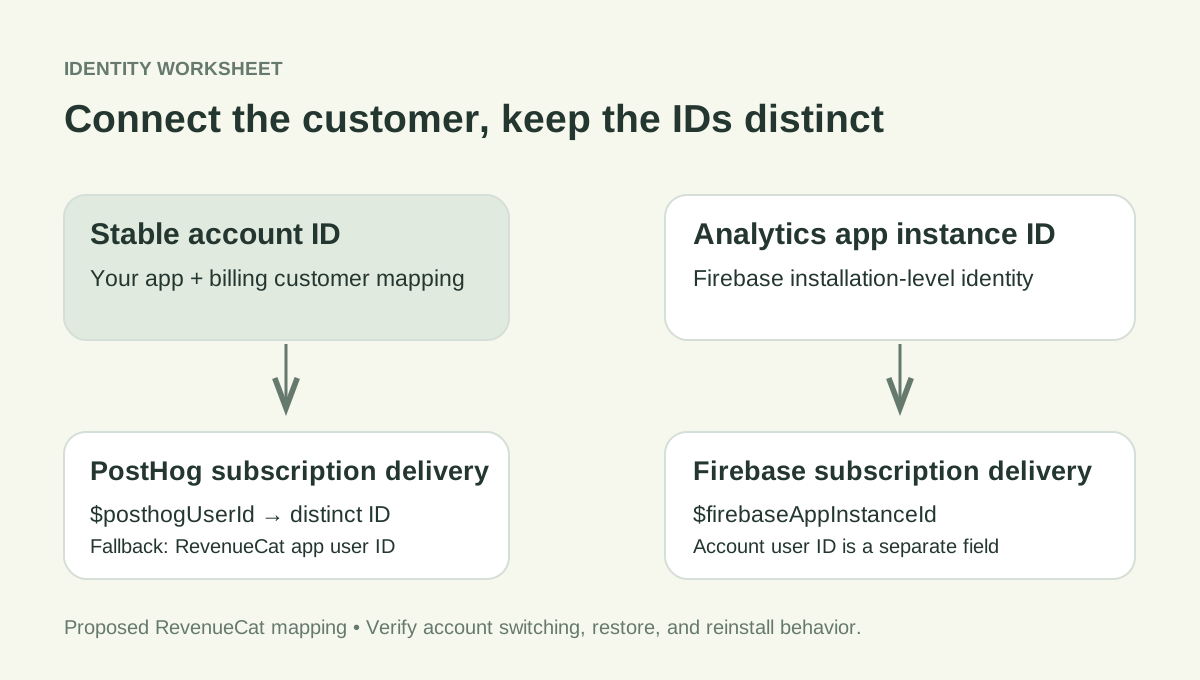
For RevenueCat’s PostHog integration, set $posthogUserId to the intended PostHog ID; otherwise the integration falls back to the RevenueCat app user ID. Its Firebase Analytics integration requires $firebaseAppInstanceId from Firebase Analytics. A Firebase Auth UID does not substitute for that app instance ID.
An app with no login needs an explicit anonymous-customer strategy. Record what happens on reinstall, restore, a new device, and a later account creation. A shared string is useful only if it represents the same customer in every system.
Treat StoreKit and server subscription events separately
Firebase’s current iOS purchase guide distinguishes StoreKit 1 automatic purchase logging from its StoreKit 2 example, which calls Analytics.logTransaction with a verified transaction. Follow the guidance for the SDK version and purchase framework you actually ship. The guide also warns that manually logged IAP events are not deduplicated against automatic logging.
That makes “install the SDK and every renewal is solved” an unsafe acceptance criterion. A purchase button can lead to cancellation, a pending purchase, or a trial rather than collected revenue. Subsequent billing changes may happen while the app is closed. Use your verified billing system as the authority for subscription state; analytics is a consumer of those facts.
RevenueCat offers server subscription integrations for both destinations. Their mappings differ: its Firebase integration uses purchase for renewals including trial conversion, while PostHog has a separate default trial-converted event. Review event properties and choose the matching cohort condition. Select a single authoritative revenue stream for each report so SDK purchase logging plus an integration cannot count the same transaction twice.
A further constraint matters if you run Firebase experiments: RevenueCat’s Firebase documentation says its Measurement Protocol events cannot currently be used with Firebase A/B Testing. An event arriving in Analytics does not establish that every Firebase feature can use it.
Build two funnels before judging either dashboard
Use an activation funnel for onboarding_completed → paywall_viewed → trial_started, and a separate mature-trial cohort for trial_started → first_paid_period_started. This keeps a seven-day trial from looking like immediate paywall abandonment. Analyze direct paid purchases separately because those customers never enter the trial step.
Write down the date range, project time zone, unique-person rule, event order, repeat-event treatment, environment filter, and conversion window in both tools. Exclude newly started trials that have not yet had time to convert. A week containing 100 trial starts and 20 payments does not by itself prove a 20% trial conversion rate: the payments may belong to an earlier cohort.
For retention, select a meaningful return action such as completing the app’s core task. A server renewal is evidence of continued billing, not evidence that someone opened the app. PostHog’s retention insights let you specify the start and return events. In Google Analytics, check that your chosen cohort or exploration answers the same definition before comparing percentages.
When the numbers disagree, inspect the underlying identities and event timestamps first. Then compare filters and report definitions. Migrating to a second platform will not repair a broken event contract.
A SwiftUI pilot should leave evidence, not impressions
Instrument important actions explicitly in the first pilot. Firebase’s screen-view guide calls out manual screen naming for SwiftUI. PostHog has an iOS SDK, but a web autocapture example does not establish coverage of your SwiftUI view hierarchy. If Replay is part of the decision, test its screenshot mode and masking on the screens you actually need.
Use a separate test environment and record the app commit, exact SDK versions, iOS version, collection settings, test-customer IDs, and server integration configuration. Walk through a new anonymous install, onboarding, paywall, account creation, verified purchase, logout, and a second account. Add restore and renewal cases using the billing system’s supported test flow.
For each event, save its logical name, device timestamp, destination identity, received payload, first-visible timestamp, and report inclusion. Firebase’s DebugView provides a development validation path with minimal upload delay. It is a different observation from waiting for normal reporting. Inspect PostHog ingestion separately; do not turn either tool’s debug view into a production latency benchmark.
The pilot passes when each destination receives the intended event once, associates it with the intended customer, and produces an explainable funnel. This article provides the worksheet; it does not claim those execution results.
Compare export and maintenance costs too
Firebase lists Analytics as a no-cost product. That does not make every connected Firebase service or warehouse workload free. Google’s BigQuery Export documentation specifies a one-million-event limit for the Daily export mode on standard properties and distinguishes export options and associated costs. Streaming export has no event-volume cap but has additional costs and completeness caveats. Check the export type, storage, queries, and project billing before treating a warehouse plan as unlimited.
PostHog supports batch exports to destinations including BigQuery and S3. Its events and persons models serve different purposes: retaining event rows alone does not give you the complete mutable identity mapping. Confirm the needed export models and destination permissions before relying on a later migration.
For either choice, budget engineering time for schema changes, SDK updates, identity tests, deletion workflows, and monitoring billing-event delivery. If you temporarily send to both, one app-level event owner should feed two adapters. Give the comparison an end date and a specific decision, such as whether a support investigation becomes easier to explain. Otherwise the second SDK can become permanent maintenance without a clear benefit.
Keep Firebase, add PostHog, or run a bounded comparison
- Keep Firebase Analytics when your team already trusts its event definitions and uses Google Analytics or BigQuery to answer the required questions. Fix a missing identity mapping or subscription feed before deciding the whole platform is wrong.
- Evaluate PostHog when a recurring product question calls for moving between a funnel, a person’s events, and a configured iOS replay. Verify that your SwiftUI screens produce useful recordings and that the people investigating issues can use the result.
- Use both temporarily when you need direct evidence from the same event dictionary. Keep Firebase Auth, Firestore, and Crashlytics if they still meet your needs; an analytics comparison is not a backend migration.
For a short additional explanation, PostHog’s identification guide links to an official identity walkthrough on YouTube. Use it to understand anonymous-to-identified behavior, then use the current SDK documentation for implementation. The video is not pricing evidence or a substitute for an iOS test.
If you choose PostHog, our acquisition-to-RevenueCat guide expands on the behavioral-to-billing connection. Hogly on iPhone is an optional way to review PostHog while away from your desk; it is a separate product and does not collect your Firebase events.
Quick answers
Frequently asked.
Do I have to remove Firebase to add PostHog to an iOS app?
No. This comparison concerns Analytics. Firebase Auth, Firestore, Crashlytics, and other Firebase services are separate choices. If you run both analytics SDKs, define one event dictionary and test each destination’s identity and collection settings.
Does Firebase Analytics automatically track every iOS subscription event?
Do not assume that. Firebase’s current guide distinguishes StoreKit 1 automatic logging from the StoreKit 2 verified-transaction logging example. Validate your SDK and purchase flow, and use a verified billing source for subscription changes that happen while the app is closed.
Can RevenueCat send subscription events to both PostHog and Firebase Analytics?
RevenueCat documents integrations for both. PostHog uses the $posthogUserId customer attribute or falls back to the RevenueCat app user ID. Firebase Analytics requires its Analytics app instance ID. Their default event names and downstream feature compatibility differ.
Will setting a Firebase user ID connect all previous anonymous events?
Firebase documents that a user ID applies to future events and does not change previously recorded events. Define how you will analyze earlier app-instance events alongside account events, especially when using BigQuery exports.
Is PostHog session replay the same on SwiftUI and the web?
No. PostHog has a separate iOS Replay setup, and its current documentation requires screenshot mode for SwiftUI. Test masking and recording behavior on your own screens rather than assuming browser SDK behavior applies.