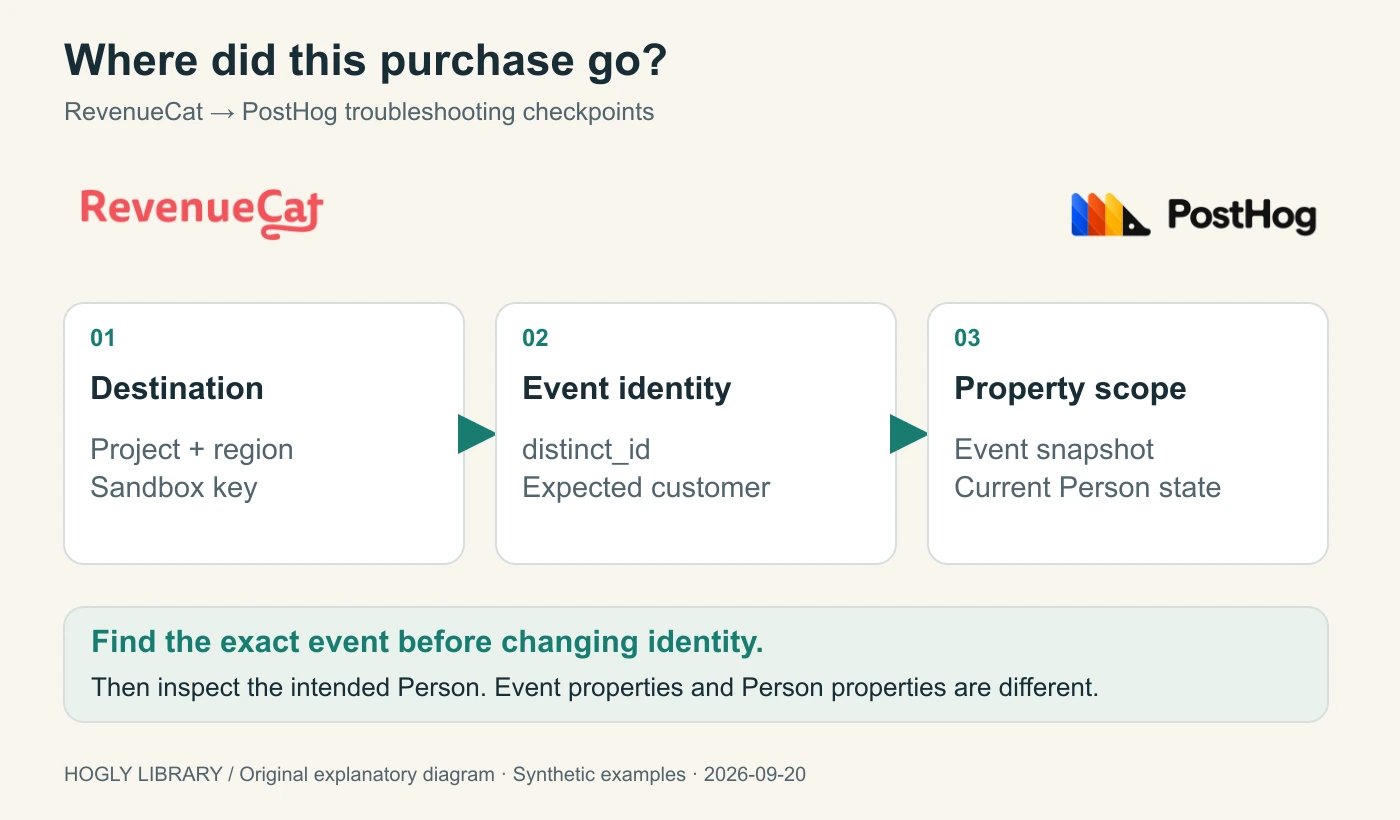
When a RevenueCat purchase looks missing in PostHog, first find the exact event in the intended project. Then compare its distinct ID with the customer you expected, and inspect event properties separately from Person properties. Those are three different failure modes, with different fixes.
The short version
- Check project, region, sandbox destination and configured event name before changing identity.
- RevenueCat’s PostHog user attribute takes precedence over its App User ID fallback.
- An event’s subscription status is an event-scoped snapshot; a current Person property needs an explicit update policy.
Classify the symptom before changing the integration
Choose a single sandbox purchase and keep its transaction, event time, product, environment, and customer ID beside you. A transaction visible in RevenueCat can be absent from one PostHog report for several reasons. Changing every setting at once makes it harder to find which reason applies.
| What you observe | What to check next | Avoid jumping to |
|---|---|---|
| No matching event in the target project | Delivery attempt, project key, region, sandbox destination and event name. | A person merge. |
| Matching event exists under an unexpected ID | The actual outgoing distinct ID and its identity mapping. | “RevenueCat never sent it.” |
| Event is on the intended customer, but Person status is absent | Event property versus Person property behavior. | Another purchase emitter. |
| Events and customer match, but money differs | Revenue definition and transaction-level reconciliation. | An identity repair without evidence. |
This is a documentation-based guide with original synthetic fixtures. We did not reproduce a vendor outage, run a production migration, or execute a merge. For first-time installation and acquisition attribution, use our RevenueCat + PostHog setup guide. The workflow here starts with a purchase that you expected to find.
Verify the destination before the person
The current RevenueCat integration guide calls for the PostHog project API key and the correct hosting region; the default region is US. Sandbox delivery requires its own configured key. Event names can be customized, so inspect the integration settings rather than assuming the default name appears in your project.
Write down the project name you are inspecting and compare it with the destination configured for this test environment. A production project with no sandbox events may be behaving exactly as configured. Likewise, a region mismatch cannot be repaired by changing a customer ID.
Use the selected transaction’s RevenueCat Customer History to check whether a PostHog integration event exists and whether delivery succeeded. Then inspect the target event in PostHog. A delivery indicator and a target event are separate records; retain both before concluding that this path works.
For a direct initial purchase, the documented default event name is rc_initial_purchase_event. A trial, trial conversion, and renewal have their own event names. Searching one name for every lifecycle stage can produce a false absence. Remove optional report filters for the first event search, then reapply them one at a time.
Compare the outgoing ID with your identity contract
RevenueCat documents $posthogUserId as the identity attribute used for this integration. When it is absent, the integration falls back to the RevenueCat App User ID. Read the actual value on the purchasing customer; knowing what your login code intended to set is not enough. Identity mapping reference.
Consider a fictional app with account ID account_042, PostHog anonymous ID anon_ph_A, and RevenueCat anonymous ID $RCAnonymousID:demo_A. Those last two strings are different namespaces. Their coexistence is normal; their spelling does not establish a link between them.
| Stage | App-side plan | What to inspect |
|---|---|---|
| Anonymous launch | PostHog has anon_ph_A; RevenueCat has $RCAnonymousID:demo_A. | Record both without assuming they are the same user record in either service. |
| Account login | Identify the PostHog user as account_042; apply your chosen RevenueCat login and mapping policy. | Check completion and the actual customer attributes before permitting the test purchase. |
| Stale mapping case | RevenueCat still has $posthogUserId = legacy_042. | The documented mapping selects legacy_042, even if the RevenueCat App User ID is account_042. |
| Corrected new-event case | The mapping is account_042, or an intentionally matching fallback is used. | Inspect the next test event’s distinct ID and the intended Person’s history. |
| Logout or account switch | Apply the SDK-specific reset/login policy before another account’s activity. | Verify a second test account does not inherit the first account’s identity. |
PostHog’s identify documentation explains how a client identify call links anonymous activity to an identified user and why logout reset matters. Backend events need the intended distinct ID. A RevenueCat aliases array in an event is not evidence that you executed PostHog’s identity operations.
The stale mapping example is a deterministic consequence of the documented precedence rule, not a captured production failure. Fix the application’s source of truth and verify a fresh event. Do not start by force-merging historical people or promising that changing a subscriber attribute repairs previous events.
A small event fixture you can inspect locally
This reduced synthetic event intentionally has a correct account ID in one property and a stale ID at the capture level. The point is to compare fields with different jobs. It is not a complete RevenueCat payload and contains no API key.
{
  "event": "rc_initial_purchase_event",
  "distinct_id": "legacy_042",
  "properties": {
    "app_user_id": "account_042",
    "transaction_id": "synthetic_tx_001",
    "rc_subscription_status": "active"
  }
}
In this fixture, searching only for app_user_id = account_042 may find the event while inspecting the intended Person still exposes the mismatched capture identity. Your next check is the integration’s selected distinct ID and existing identity links, not whether the two text values happen to look similar.
The downloadable fixture includes the expected corrected new-event variant, with distinct_id = account_042, and a separate property-order example. These are local reasoning checks. They cannot validate your project key, confirm a real merge, or prove historical data was moved.
An event property is not automatically a Person property
A RevenueCat community thread from October 2025 asked why rc_subscription_status appeared on events but not on the related Person. Support described the payload at that time as event properties without $set. That historical reply explains the question; it does not prove the current integration’s complete live behavior.
The current RevenueCat guide’s Subscription Status Attribute section says the integration updates the rc_subscription_status user attribute when events are sent. However, the same page’s sample payload puts the field inside event properties without showing $set, while the October 2025 staff reply says the integration did not update Person properties at that time. These public materials do not give a consistent account of automatic Person updates. We have not read back a current integration payload and its resulting Person or obtained current confirmation from RevenueCat, so this guide cannot assert that the integration automatically updates a Person. Inspect both scopes in your own test or request current clarification before relying on the field or adding a writer. PostHog’s Person properties guide documents explicit Person updates using $set or identify properties. The same field name does not make the two scopes interchangeable.
| Question | Useful evidence | Interpretation |
|---|---|---|
| What status accompanied this purchase? | rc_subscription_status on that event. | A snapshot associated with a historical event. |
| What status should this customer have now? | A deliberately maintained Person property or authoritative entitlement lookup. | A current-state projection with an owner and update policy. |
| Should this device unlock paid access? | The app’s subscription entitlement mechanism. | An analytics Person property should not be the access-control authority. |
RevenueCat also documents that, with multiple active subscriptions, this status represents only the subscription associated with the most recent event. It is not an aggregate entitlement decision for the whole account.
For a historical conversion analysis, the event snapshot may already be the right input. For a current subscriber cohort, specify which service owns the state, which events can change it, and how stale or duplicated inputs are handled. That is a data-model decision, not just a missing-field patch.
If you add a custom writer, test arrival order
The following risk concerns an additional custom writer that blindly copies event status into $set. It is not a test or description of RevenueCat’s internal native-integration update strategy. PostHog documents Person updates in ingestion order, rather than ordering them by the original event timestamp. A late event can overwrite a newer business state. This makes a blanket “copy every event status into the Person” recipe incomplete. Person property ordering reference.
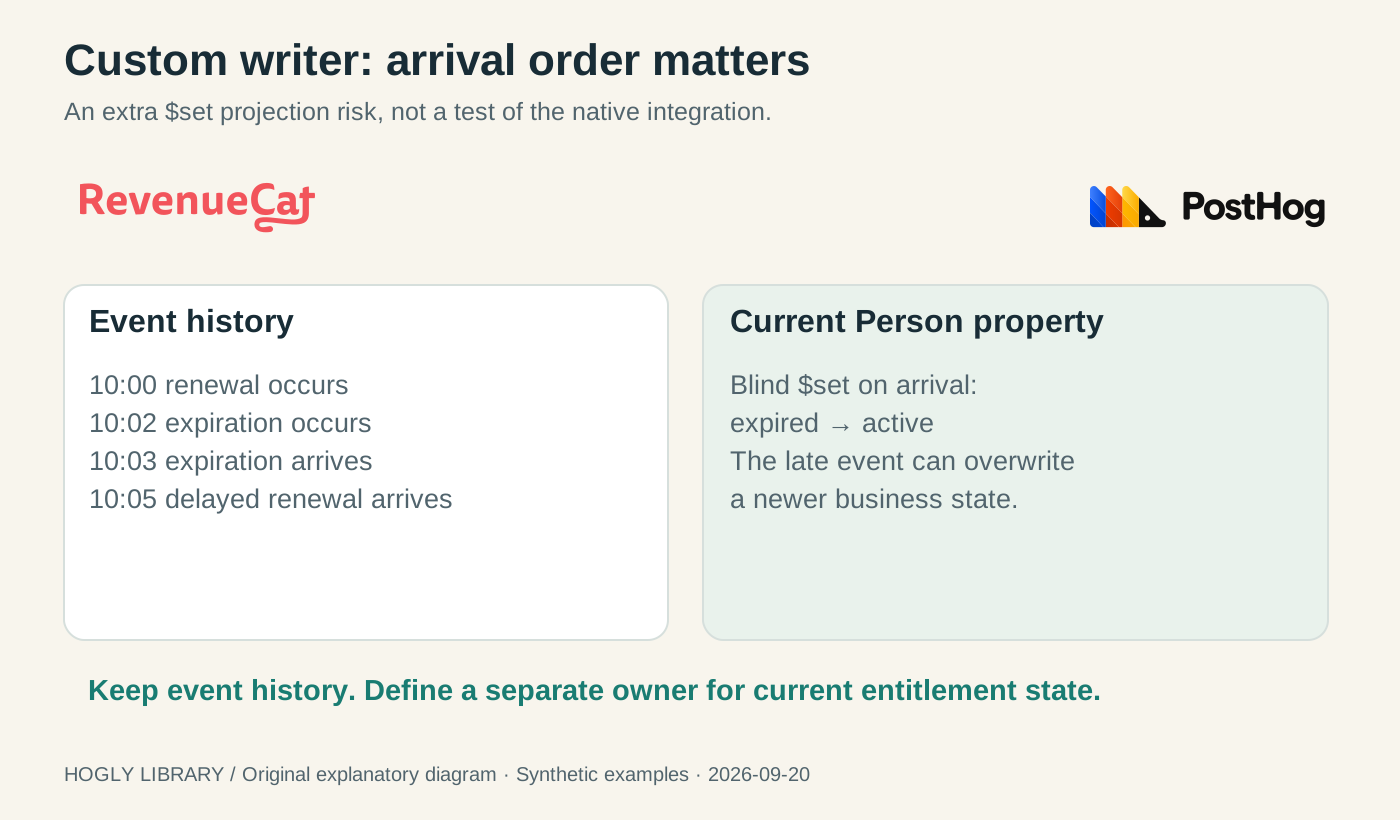
Our fixture has a renewal at 10:00 and an expiration at 10:02. The expiration arrives at 10:03; a delayed renewal arrives at 10:05. An arrival-order copy ends at active, although the later business event says expired. Reversing a list in the dashboard does not change the update policy.
If you need current state in PostHog, design a small projection with one owner. Keep a processed-event key, an explicit source timestamp or version policy, and a defined way to reconcile with the authoritative subscription state. Test delayed delivery, repeated input, and account changes. If the integration already maintains the required Person field, inspect that behavior before adding a second writer.
For this article we have only executed the local fixture logic. We are not providing a drop-in transformation or claiming that one timestamp comparison models every cancellation, refund, entitlement, and transfer rule. The reliable boundary is to keep the immutable event history and current-state projection conceptually separate.
Close the loop with a small acceptance matrix
After changing one setting, repeat the flow with a fresh test purchase and retain the before-and-after records. Expected results belong in your test plan; observed results belong in your evidence log. Do not replace the second with a screenshot of the configuration.
| Case | Expected evidence | Failure to investigate |
|---|---|---|
| Anonymous → login → purchase | One traceable purchase reaches the intended project with the agreed account identity. | Login completion or attribute synchronization differs from the planned order. |
| Second account on the same installation | The second account’s new event uses its own intended identity. | A cached or stale user mapping crosses accounts. |
| Sandbox destination | The test event is found in the configured sandbox project. | A key, environment or search-target mismatch. |
| Event status versus Person status | Both are inspected independently and match the stated property policy. | A historical snapshot is mistaken for a current-state update. |
| Delayed and repeated input | Your optional projection behaves according to its explicit rule. | Arrival-order overwrite or a second writer changes current state. |
For a support handoff, include the SDK versions, intended project and region, environment, selected transaction, RevenueCat customer identity, mapping attribute, outgoing distinct ID, and relevant filters. Redact secrets. State which facts were observed in the destination and which were inferred from configuration.
Once identity and event delivery are established, Hogly can help you inspect the existing PostHog customer journey from your phone. Our payment-notification-to-PostHog-person workflow explains that follow-up. It does not configure the integration or repair identity. Revenue totals that still disagree need a separate transaction-level reconciliation of amount, currency, period and duplicates.
Quick answers
Frequently asked.
Which user ID does RevenueCat send to PostHog?
The documented mapping uses $posthogUserId when present and falls back to the RevenueCat App User ID when absent. Inspect the actual purchasing customer’s attribute and outgoing event.
Why can I find the purchase event but not the expected Person?
Check the event’s capture distinct ID against the account identity and existing PostHog identity links. An app_user_id event property is not, by itself, proof of a Person merge.
Does rc_subscription_status automatically update a Person?
The public sources are inconsistent: the current guide says it updates a user attribute, its sample shows an event property without $set, and an October 2025 staff reply described no Person update. We have not verified a current payload and resulting Person or obtained current RevenueCat confirmation, so we cannot assert automatic Person updates. Verify both scopes; the documented status is also not an aggregate of all active subscriptions.
Should I copy every subscription status into $set?
Only after defining current-state ownership and handling late or repeated events. PostHog processes Person updates in ingestion order, so a delayed old status can overwrite a newer business state.
Will fixing the user attribute merge old purchases?
A corrected new event does not prove historical repair. Review existing identity links and a supported recovery plan separately; do not bulk-merge people based only on similar identifiers.